


You are frustrated and losing patience because you can’t figure out what’s wrong with your DTF printer, as it doesn’t print white ink properly. Bad DTF printing is not only frustrating, but it also costs you money and unhappy customers. The DTF white ink issues are among those problems that print shops and businesses often face.
When that critical white underbase turns streaky or translucent, your colors lose their pop, and your designs fail to bond, leading to prints that crack after a single wash. White ink is essential in direct-to-film printing, serving as an underbase for your DTF transfer when working with colored or dark fabrics.
It is an opaque, titanium dioxide-based pigment ink placed under the CMYK colors. The issue of white ink not printing results in poor opacity, dull prints, and adhesion problems.
If you are facing this issue, fear not, this guide is for you. It offers detailed insights into the DTF while ink not printing issue, with reasons, solutions, and tips.
DTF Printer Not Printing White: Common Reasons (and Fixes)
DTF white ink issues stem from a variety of reasons, ranging from clogging to incorrect software settings. By understanding these reasons, you can find out the specific issue you are facing in your DTF printer. Let’s discuss the most common reasons for the DTF white ink not printing.
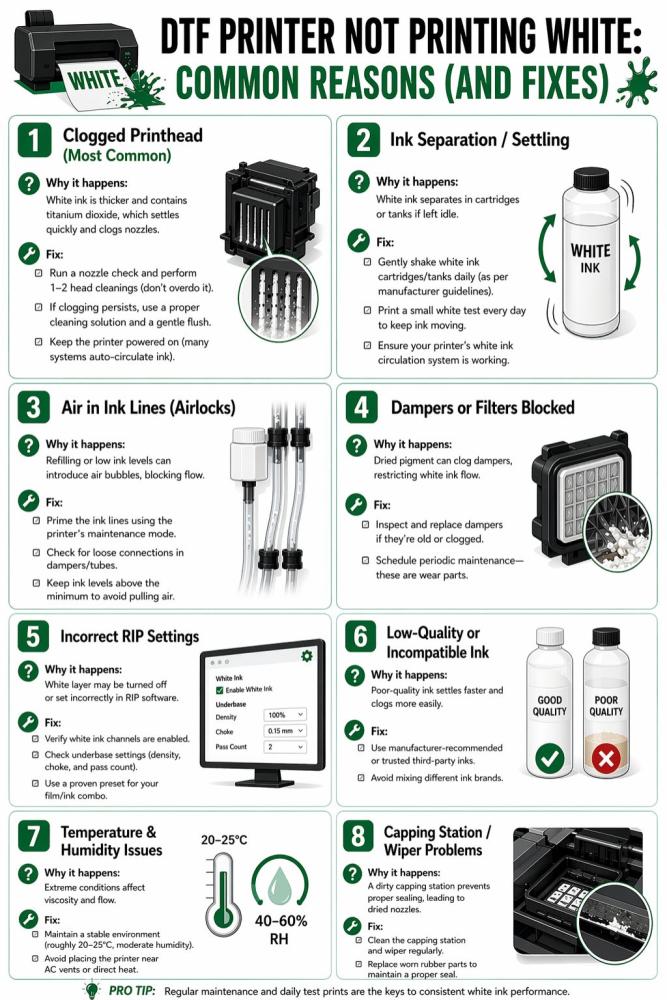
1. Clogged Printhead (Most Common)
Here is the truth: a clogged printhead is the most common reason for DTF white ink issues. The printhead can clog due to dried ink, dust, or air bubbles that block its microscopic nozzles that spray ink onto paper. Consequently, it causes poor print quality, like streaks, faded text, or missing colors.
Why it happens: White ink is thicker and contains titanium dioxide, which settles quickly and clogs nozzles.
Fix:
-
Run a nozzle check and perform 1–2 head cleanings (don’t overdo it).
-
If clogging persists, use a proper cleaning solution and a gentle flush.
-
Keep the printer powered on (many systems auto-circulate ink).
Note: Perform a test run to produce a test print that will help check the quality before a full run.
2. Ink Separation / Settling
In DTF printing, ink settling (sedimentation) and separation are common issues because of the heavy white pigment in the white ink. It occurs when the heavy titanium dioxide pigments separate from the liquid binder and sink to the bottom of containers, dampers, and lines, which leads to a clogged printhead.
Hence, you should regularly shake the white ink bottle to avoid such an issue. For shops managing bulk wholesale printing, the constant flow of high-volume orders naturally helps prevent pigment settling, keeping your white ink vibrant and your nozzles clear.
Why it happens: White ink separates in cartridges or tanks if left idle.
Fix:
-
Gently shake white ink cartridges/tanks daily (as per manufacturer guidelines).
-
Print a small white test every day to keep ink moving.
-
Ensure your printer’s white ink circulation system is working.
3. Air in Ink Lines (Airlocks)
Airlock or vapor lock is an issue that occurs when air bubbles are trapped within dampers, supply lines, or the printhead. Consequently, it can partially or fully block white ink circulation, resulting in poor prints.
Why it happens: Refilling or low ink levels can introduce air bubbles, blocking flow.
Fix:
-
Prime the ink lines using the printer’s maintenance mode.
-
Check for loose connections in dampers/tubes.
-
Keep ink levels above the minimum to avoid pulling air.
4. Dampers or Filters Blocked
Clogged dampers or filters can cause ink starvation, where ink may gradually fade with each print job. This often occurs when dried ink prevents liquid ink from reaching the nozzles. Manual maintenance is the way to fix DTF white ink issue in this case.
Why it happens: Dried pigment can clog dampers, restricting white ink flow.
Fix:
-
Inspect and replace dampers if they’re old or clogged.
-
Schedule periodic maintenance—these are wear parts.
5. Incorrect RIP Settings
In almost 90% of the color and quality issues in DTF printing, the incorrect RIP (Raster Image Processor) settings are the main culprits. It serves as a translator between your DTF printer and image file. So, any mistakes in settings can result in undesired output in production.
Why it happens: The white layer may be turned off or set incorrectly in the RIP software.
Fix:
-
Verify white ink channels are enabled.
-
Check underbase settings (density, choke, and pass count).
-
Use a proven preset for your film/ink combo.
6. Low-Quality or Incompatible Ink
Another reason for failure in white ink printing can be the use of low-quality or incompatible ink. Such inks lack the stable chemistry that can handle the heavy titanium dioxide pigment.
Why it happens: Poor-quality ink settles faster and clogs more easily.
Fix:
-
Use manufacturer-recommended or trusted third-party inks.
-
Avoid mixing different ink brands.
7. Temperature & Humidity Issues
DTF white ink is quite sensitive to the temperature and humidity around it. Low humidity (below 40%) and high humidity (above 65%) cause issues like nozzle drying, ink thickening, improper white ink drying, powder clumping, and more.
Why it happens: Extreme conditions affect viscosity and flow.
Fix:
-
Maintain a stable environment (roughly 20–25°C, moderate humidity).
-
Avoid placing the printer near AC vents or direct heat.
8. Capping Station / Wiper Problems
It refers to the failure of the mechanical assembly responsible for cleaning and sealing the printhead. As a result, you face issues like poor seal, suction failure, regurgitation, wiper hardening, incomplete whipping, etc.
Why it happens: A dirty capping station prevents proper sealing, leading to dried nozzles.
Fix:
-
Clean the capping station and wiper regularly.
-
Replace worn rubber parts to maintain a proper seal.
Non-Printer Reasons for DTF White Ink Issues (and How to Fix)
The printer isn’t the only reason for DTF printing white ink issues. It can occur for many other reasons, like poor curing, bad film quality, improper heat press, and so on. So, you must check out these reasons to identify if any of these issues are causing the “DTF white ink not printing” problem in your case.
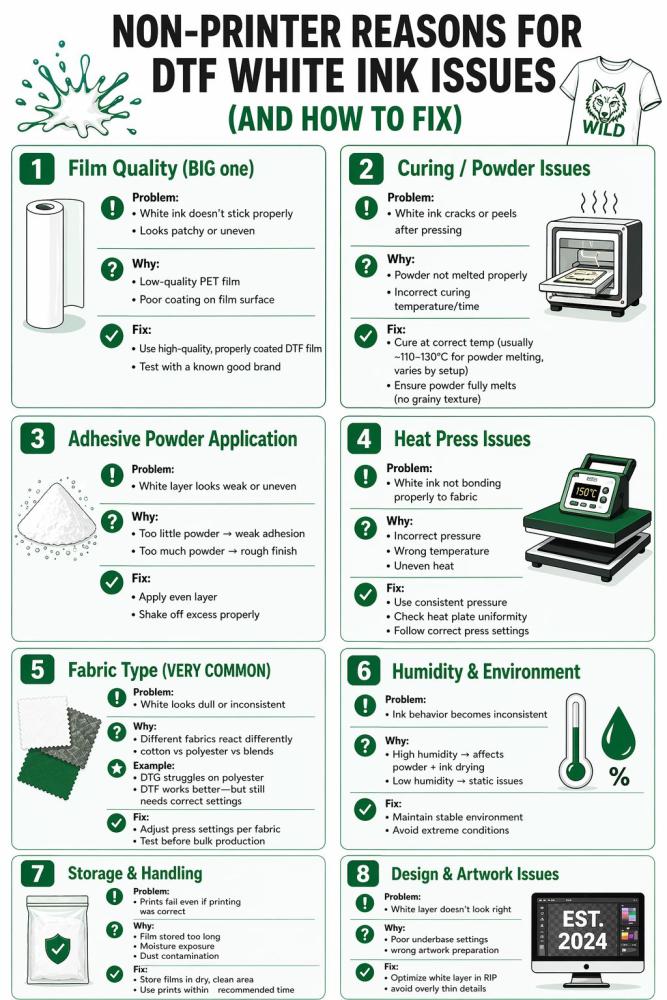
Film Quality (BIG one)
The quality of your PET transfer film plays a crucial role in DTF white ink dull or faded. Since it’s the base of your print, the quality can affect the overall performance of your print. Low-quality or incompatible films can cause visual defects like puddling or complete transfer failure.
Problem:
-
White ink doesn’t stick properly
-
Looks patchy or uneven
Why it happens:
-
Low-quality PET film
-
Poor coating on the film surface
Fix:
-
Use high-quality, properly coated DTF film
-
Test with a known good brand
Curing / Powder Issues
The white ink serves as a wet foundation for the DTF powder. If the powder is not properly cured (undercured or overcured), the white ink layer fails. Poor curing can result in several issues, such as adhesion failure, hard and brittle white underbase, yellowing, oil migration, and more. Follow the proper powder curing process to avoid the DTF white ink issues.
Problem:
-
White ink cracks or peels after pressing
Why:
-
Powder not melt properly
-
Incorrect curing temperature/time
Fix:
-
Cure at correct temp (usually ~110–130°C for powder melting, varies by setup)
-
Ensure powder fully melts (no grainy texture)
Adhesive Powder Application
Just like curing, the proper application of DTF powder is also essential to avoid the DTF white ink problems. Too much or too little powder can cause an uneven layer of white ink. Like, if the powder doesn’t fully cover the white ink layer, the white underbase will look grainy or textured like sandpaper.
Problem:
-
White layer looks weak or uneven
Why:
-
Too little powder → weak adhesion
-
Too much powder → rough finish
Fix:
-
Apply an even layer
-
Shake off excess properly
Heat Press Issues
During the heat press, the white ink issue may occur due to uneven pressure and incorrect temperature. An error in the heat press results in white ink failure. Follow the right pressing time and temperature for the heat press to ensure quality results.
Problem:
-
White ink not bonding properly to the fabric
Why:
-
Incorrect pressure
-
Wrong temperature
-
Uneven heat
Fix:
-
Use consistent pressure
-
Check heat plate uniformity
-
Follow the correct press settings
Fabric Type (VERY COMMON)
White ink reacts differently to various fabric materials because it’s heavy. As a result, you can face printing issues with color, texture, and durability. For some materials, DTF is more suitable, and for some others, results may vary.
Problem:
-
White looks dull or inconsistent
Why:
-
Different fabrics react differently
-
cotton vs polyester vs blends
Example:
-
DTG struggles with polyester
-
DTF works better—but still needs correct settings
Fix:
-
Adjust press settings per fabric
-
Test before bulk production
Humidity & Environment
Both humidity and environment directly affect the viscosity of the water-based white ink. So, the changes in these factors can affect white ink performance.
Problem:
-
Ink behavior becomes inconsistent
Why:
-
High humidity → affects powder + ink drying
-
Low humidity → static issues
Fix:
-
Maintain a stable environment
-
Avoid extreme conditions
Storage & Handling
DTF transfer storage also plays a crucial role in the white ink issues. Storing transfers in a place with extreme light exposure, high temperatures, high moisture, and contamination is a reason for DTF white ink problems. You need to ensure proper storage of your DTF transfers to fix DTF white ink issue if this is the cause behind it.
Problem:
-
Prints fail even if printing was correct
Why:
-
Film stored too long
-
Moisture exposure
-
Dust contamination
Fix:
-
Store films in a dry, clean area
-
Use prints within the recommended time
Design & Artwork Issues
The way you prepare your digital artwork for DTF printing is as important as the maintenance of your equipment for seamless white ink printing. Incorrect settings lead to ghost pixels, thin lines, and resolution issues that ruin your print and the white ink.
Problem:
-
The white layer doesn’t look right
Why:
-
Poor underbase settings
-
wrong artwork preparation
Fix:
-
Optimize the white layer in RIP
-
avoid overly thin details
To Wrap Up
Solving DTF white ink issues is the difference between a struggling side project and a profitable, industrial-scale brand. While these challenges are common, they aren't insurmountable. By staying disciplined with daily maintenance—shaking your tanks, monitoring humidity, and verifying your RIP settings—you can effectively fix DTF white ink problems before they drain your budget or damage your reputation.
At Shirt.co, we know that consistent, opaque prints are the backbone of professional apparel. Understanding the technical roots of DTF printing white ink issues allows you to spend less time troubleshooting and more time creating. Keep your equipment clean, your environment stable, and your focus on quality to ensure every transfer you press is vibrant, durable, and retail-ready.
Frequently Asked Questions
Why is my printer only outputting color ink and not the white underbase?
Your white ink likely settled or clogged. It’s heavy and needs a good shake or active circulation to move. If the lines are clear, check your software. A disabled underbase or a missing "spot channel" will kill your white layer every time.
How do I fix DTF transfers that are peeling, cracking, or not sticking?
Check your heat press. Peeling usually means your temp, pressure, or time is too low. Aim for 280–320°F for 15–20 seconds with firm pressure. Also, look at your powder. It must be melted into a smooth, "sugar-like" glaze before you ever touch the press.
Why do my prints look dull or have incorrect colors?
Dirty nozzles are the usual culprit. Run a head cleaning and a nozzle check immediately. If the hardware is fine, look at your color settings. Ensure your files are matched to your software's color profile. High-definition results require clean heads and calibrated settings.
How often is maintenance required to prevent printhead clogging?
Every single day. Don't skip it. Run a nozzle check daily and keep your room humidity above 40%. If the air is too dry, the ink turns to glue inside the head. A little daily care prevents a total equipment meltdown.
How should I store my DTF transfers to keep them from going bad?
Keep them away from air and dust. Moisture is the enemy here; it causes wrinkles and ugly spots. Use an airtight container with silica gel packs. Proper storage ensures the adhesive stays strong and the film stays flat for a perfect bond.