


Just imagine, a print shop in Houston ships a batch of custom shirts. Everything looks perfect—until customers report peeling designs after the first wash. That’s how DTF printing spoilage quietly eats into profits.
In simple terms, spoilage includes damaged, rejected, cracked, misprinted, or returned transfers caused by production failures. Even if a small 5–10% failure rate exists, it can create major losses through wasted film, ink, garments, labor, refunds, and reprints.
Shops trying to reduce DTF spoilage and minimize DTF returns often overlook environmental factors too. High-humidity regions like Florida, Louisiana, and the Texas Gulf Coast face elevated risks because moisture interferes with adhesive curing and transfer bonding.
This guide explains the biggest spoilage causes, regional risk factors, and practical ways to improve production consistency and reduce waste.
What Is Spoilage in DTF Printing and What are Its Types?
Spoilage in DTF printing refers to any transfer or garment that fails quality standards due to defects in printing, curing, application, or materials, including peeling, cracking, fading, misalignment, and adhesion failure. It results in wasted product, customer returns, production delays, and reduced profit margins.
Unlike some traditional printing defects, most DTF print quality issues are highly preventable when proper process control, humidity management, curing accuracy, and application settings are maintained consistently.
Types of DTF Spoilage
DTF spoilage can happen at multiple production stages:
-
Pre-Press Spoilage: Film scratches, clogged printheads, uneven ink flow, powder contamination, or poor artwork preparation before pressing
-
Press Spoilage: Incorrect temperature, uneven pressure, over-curing, under-curing, or transfer alignment errors during heat pressing
-
Post-Press Spoilage: Wash durability failures, fading, cracking, lifting edges, or common DTF transfer peeling issues after customer use
This is where long-term durability becomes critical. A properly produced transfer should maintain strong adhesion and visual consistency for extended wear cycles, with many premium transfers targeting DTF print durability 50 washes or more under correct application conditions.
Visible vs Hidden Spoilage
|
Visible Spoilage |
Hidden Spoilage |
|
Misaligned transfers |
Returns after customer delivery |
|
Smudged or blurry prints |
Peeling after washing |
|
Burn marks or curing defects |
Long-term cracking and fading |
|
Immediate adhesion failure |
Reputation damage and lost repeat orders |
Hidden spoilage is often more expensive because the problem appears after delivery — leading to refunds, reprints, and customer dissatisfaction.
Even a 5–10% spoilage rate on bulk orders can significantly reduce profitability through wasted film, ink, garments, labor, and shipping costs.
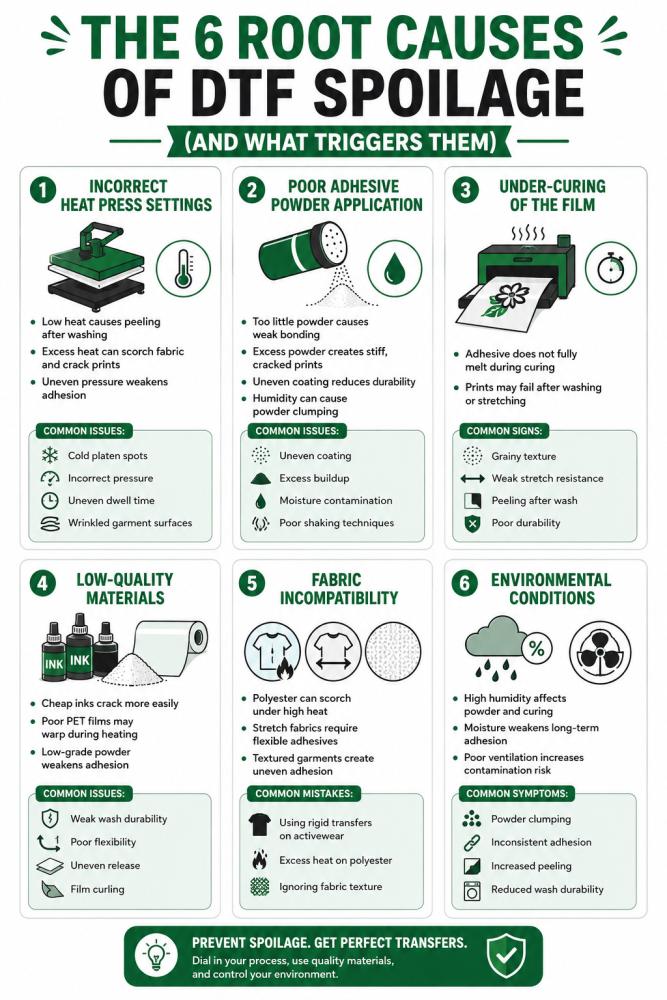
The 6 Root Causes of DTF Spoilage (And What Triggers Each)
Most DTF print quality issues do not happen randomly. They usually come from small process failures that build up during production. Peeling transfers, cracked prints, fading graphics, adhesion failure, and inconsistent wash durability are often symptoms of deeper workflow problems.
Whether you run small custom orders or high-volume bulk wholesale printing operations, understanding these root causes is critical if you want to reduce your DTF spoilage rate and maintain consistent production quality.
Cause 1: Incorrect Heat Press Settings
Heat press calibration is one of the biggest contributors to DTF spoilage. Even small temperature or pressure variations can weaken adhesive bonding.
For most DTF workflows, the ideal pressing range sits around:
-
305–310°F
-
10–12 seconds dwell time
-
Medium-to-firm pressure
When temperatures are too low, the adhesive powder fails to fully activate. The transfer may initially look fine but starts peeling after washing because the bond never fully formed.
Excessive heat creates different problems. Overheating can scorch fabrics, flatten colors, weaken adhesive flexibility, and contribute to DTF print cracking after wash cycles.
Uneven platen pressure is another overlooked issue. Seams, wrinkles, and inconsistent pressure zones prevent proper adhesion across the design surface.
Common DTF heat press problems include:
-
Cold spots in the platen
-
Incorrect pressure calibration
-
Inconsistent dwell timing
-
Uneven garment surfaces
Small press inconsistencies often become expensive spoilage problems later.
Cause 2: Poor Adhesive Powder Application
Adhesive powder controls how well the transfer bonds to fabric. Improper powder application is one of the most common DTF adhesive powder issues in production environments.
Too little powder creates weak adhesion and edge lifting. Too much powder creates stiff transfers that crack under stretch or repeated washing. Uneven powder distribution causes patchy bonding and inconsistent durability.
Moisture exposure creates even bigger problems. Powder stored in humid environments often absorbs moisture and begins clumping. Once clumped, it melts unevenly during curing and weakens transfer performance significantly.
Common powder-related spoilage triggers include:
-
Uneven powder coating
-
Excess adhesive buildup
-
Humidity contamination
-
Low-quality adhesive blends
-
Poor powder shaking techniques
Many shops focus heavily on printers and inks while overlooking adhesive consistency — even though adhesive failure is one of the biggest drivers of DTF spoilage.
Cause 3: Under-Curing of the Film
One of the most deceptive DTF ink curing problems is under-curing.
The transfer may appear completely normal immediately after production. Colors look vibrant. Adhesion seems fine. But after washing or stretching, the print starts cracking or peeling because the adhesive powder never fully cured.
During curing, the adhesive should melt evenly into a smooth “orange peel” texture. If curing temperatures are too low or curing time is too short, powder remains partially unmelted.
This creates hidden weakness inside the transfer layer.
Common signs of under-curing include:
-
Grainy powder texture
-
Weak stretch resistance
-
Peeling after first wash
-
Poor long-term durability
Under-curing is one of the biggest reasons shops experience DTF print defects that only appear after customer use.
Cause 4: Low-Quality or Incompatible Materials
Not all DTF materials perform equally. Cheap consumables often create major consistency problems.
Low-quality inks may lack flexibility, especially on stretch fabrics. As garments flex during wear, brittle inks crack more easily.
Inferior PET films can warp under heat, affecting transfer alignment and curing consistency. Low-grade adhesive powders often lose bonding strength quickly after washing.
Material-related spoilage problems include:
-
Weak wash durability
-
Cracking on athletic apparel
-
Poor ink flexibility
-
Uneven transfer release
-
Film curling during printing
Many shops trying to cut production costs accidentally increase their DTF spoilage rate through poor material selection.
Reliable materials usually reduce waste long-term, even if upfront costs are slightly higher. Shops handling frequent gang sheet printing jobs especially benefit from using stable, high-quality films and adhesive systems because consistency becomes more important at scale.
Cause 5: Fabric Incompatibility
Fabric type dramatically affects transfer performance.
Cotton is generally forgiving, but polyester, spandex, fleece, and textured garments create additional challenges. Polyester fabrics are heat-sensitive and can scorch or dye-migrate under high temperatures. Stretch garments require flexible inks and adhesives capable of moving with the fabric.
Textured fabrics like fleece or ribbed knits create uneven contact surfaces that hide weak adhesion points until washing exposes the failure.
Common fabric-related DTF printing mistakes include:
-
Using standard adhesive on stretch apparel
-
Applying excessive heat to polyester
-
Ignoring textured garment surfaces
-
Using rigid transfers on athletic wear
This is why some transfers perform perfectly on cotton but fail quickly on activewear or performance fabrics.
Cause 6: Environmental Conditions
Humidity is one of the most underestimated causes of DTF spoilage.
Production environments above 60% humidity can disrupt adhesive behavior significantly. Moisture interferes with powder consistency, curing stability, and long-term adhesion strength.
This becomes especially problematic in regions like:
-
Florida
-
Texas Gulf Coast
-
Louisiana
-
Georgia
-
Southeast U.S. production areas
High humidity causes adhesive powder to absorb moisture from the air, leading to uneven melting and bonding issues. Poor ventilation further increases contamination risk by trapping airborne moisture around the curing process.
Environmental spoilage symptoms include:
-
Powder clumping
-
Inconsistent adhesion
-
Increased peeling rates
-
Variable curing performance
-
Reduced wash durability
Many shops blame equipment when the real problem is uncontrolled environmental conditions.
Proper climate control often reduces DTF print quality issues more effectively than changing printer settings alone.
How to Minimize DTF Returns: 6-Step Prevention Checklist
Reducing DTF printing spoilage starts with controlling the small production details that most shops overlook. Many cases of spoilage in DTF printing happen because of inconsistent workflows, rushed production, or skipped quality checks. The good news is that most DTF transfer quality issues are highly preventable with a repeatable process.
Below is a simple six-step system professional shops use to reduce waste, improve wash durability, and minimize costly customer returns.
Step 1: Pre-Press the Garment
Always pre-press garments for 2–3 seconds before applying the transfer. This removes trapped moisture, smooths wrinkles, and prepares the fabric surface for proper adhesion.
This step becomes especially important in humid regions like Florida, Texas Gulf Coast, and the Southeast, where moisture inside garments can interfere with adhesive bonding.
Why it matters:
-
Prevents steam-related adhesion failure
-
Improves transfer consistency
-
Reduces edge lifting after washing
Step 2: Calibrate Heat Press Settings by Fabric Type
Different fabrics require different heat settings. Cotton and cotton blends generally perform best around 305–310°F, while polyester often needs slightly lower temperatures to avoid scorching or dye migration.
Maintain a production log documenting:
-
Temperature settings
-
Pressure level
-
Pressing time
-
Fabric type
This helps reduce inconsistencies across future production runs.
Why it matters:
-
Prevents over-pressing and under-bonding
-
Improves repeatability
-
Reduces transfer cracking and peeling
Step 3: Apply Adhesive Powder Evenly
Uneven powder application is one of the biggest causes of transfer failure. Shake powder in a clean, dry tray and tap off excess adhesive before curing.
For high-volume production, automated powder shakers improve consistency significantly. Store powder in airtight containers to prevent humidity contamination and clumping.
Why it matters:
-
Prevents patchy adhesion
-
Reduces stiff transfers
-
Improves long-term durability
Step 4: Cure the Transfer Completely
Under-cured transfers often look fine initially but fail after washing. Confirm curing oven temperature and dwell time based on your specific film and powder combination.
A properly cured transfer should feel smooth and slightly textured — never sticky or grainy.
Why it matters:
-
Prevents post-wash peeling
-
Improves adhesive activation
-
Reduces hidden transfer weakness
Step 5: Follow the Correct Peel Method
Always follow supplier instructions for hot peel or cold peel films. Peeling too early or incorrectly can disturb the adhesive bond before it fully stabilizes.
Why it matters:
-
Prevents edge lifting
-
Protects transfer structure
-
Improves final finish quality
Step 6: Run a Wash Test Before Bulk Production
Before committing to large production runs, press one sample first. Wait 24 hours, wash the garment, then inspect for peeling, cracking, fading, and edge separation.
Perform both:
-
Stretch test
-
Edge adhesion check
This small step can prevent expensive reprints during large-volume jobs or white label production workflows.
Conclusion
Reducing DTF printing spoilage comes down to consistency. Most peeling, cracking, and adhesion failures are caused by preventable issues involving heat, pressure, curing, humidity, or material handling.
By improving workflow control, testing before production, and following proper application settings, print shops can reduce waste, minimize returns, and improve long-term profitability. Understanding the real causes of spoilage in DTF printing helps create more durable transfers and more reliable production results.