


When it comes to applying vibrant designs and logos to tote bags, DTF (Direct-to-Film) printing has emerged as a popular choice. It is a heat transfer method that prints designs onto a special PET film and then transfers them onto fabric using heat and pressure.
This technique allows businesses and creators to produce colorful, durable, and highly detailed prints on different tote bag materials with minimal setup time. It works for customizing different kinds of tote bags, including cotton, canvas, blends, and even jute or polypropylene.
Because of its flexibility and cost-effectiveness, DTF tote bags are widely used for promotional merchandise, retail products, and personalized fashion accessories. If you are searching “Can you use DTF on canvas bags?”, this is the right place for you, as we are going to discuss how DTF printing works for canvas tote bags.
Besides, we will see the role of DTF printing in all kinds of tote bags, requirements for DTF printing on tote bags, tips for optimal printing, and more. So, let’s get started to understand how to use DTF transfers on canvas bags.
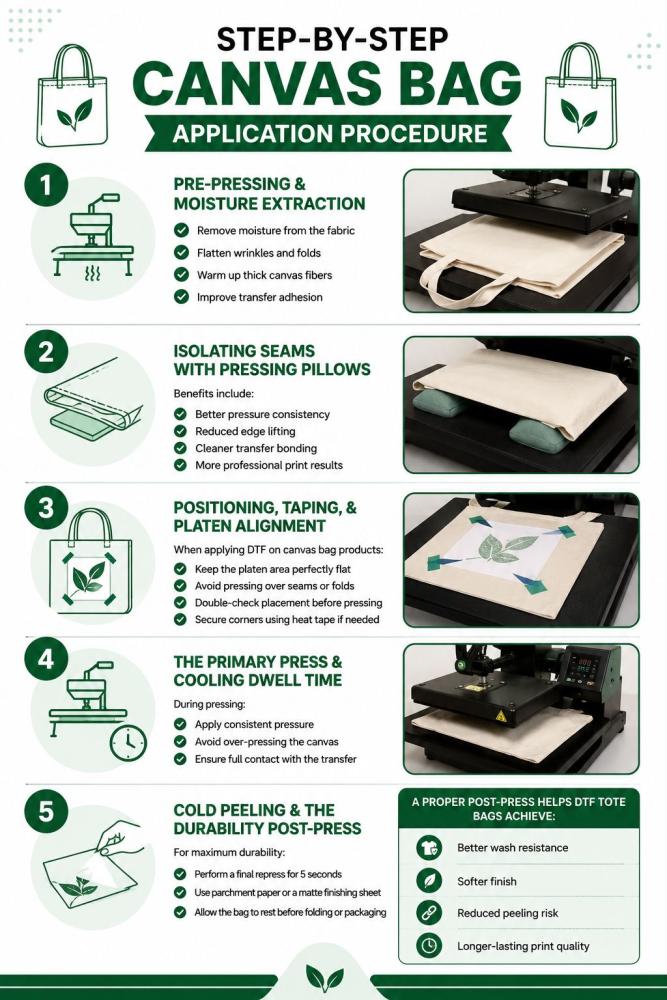
Step-by-Step Canvas Bag Application Procedure
Applying DTF on canvas bag surfaces requires more precision than regular t-shirt printing. Canvas is thicker, textured, and often contains seams that can affect pressure distribution during pressing. If the setup is wrong, the transfer may peel, crack, or fail to bond properly.
The good news is that properly applied DTF tote bags can look extremely professional, durable, and vibrant. Following the correct pressing process helps improve adhesion, wash durability, and print consistency.
Step 1: Pre-Pressing & Moisture Extraction
Canvas naturally absorbs moisture from the environment. Even small amounts of trapped moisture can interfere with adhesive bonding during the heat press cycle. Before applying DTF on canvas bag materials, always pre-press the tote bag for 5–10 seconds.
This step helps:
-
Remove moisture from the fabric
-
Flatten wrinkles and folds
-
Warm up thick canvas fibers
-
Improve transfer adhesion
Use medium pressure during pre-pressing. Make sure the pressing area is completely flat before positioning the transfer.
Step 2: Isolating Seams with Pressing Pillows
Canvas tote bags often have thick side seams, bottom stitching, and handles that create uneven pressure under the heat press. Uneven pressure is one of the biggest reasons DTF tote bags fail.
Place a pressing pillow or heat-resistant foam pad inside the bag underneath the print area. This isolates the seams and raises the printable area evenly.
Benefits include:
-
Better pressure consistency
-
Reduced edge lifting
-
Cleaner transfer bonding
-
More professional print results
Without seam isolation, certain parts of the transfer may not fully adhere to the canvas surface.
Step 3: Positioning, Taping, & Platen Alignment
Careful alignment is important because canvas bags do not stretch like t-shirts. Once the transfer is pressed, repositioning is impossible.
Center the design carefully and use heat-resistant tape to secure the transfer film. This prevents shifting during pressing.
When applying DTF on canvas bag products:
-
Keep the platen area perfectly flat
-
Avoid pressing over seams or folds
-
Double-check placement before pressing
-
Secure corners using heat tape if needed
Good alignment improves both appearance and durability.
Step 4: The Primary Press & Cooling Dwell Time
Most DTF tote bags press well between 300°F–320°F for 12–15 seconds using medium to firm pressure. However, always follow the transfer manufacturer’s recommended settings. With the right DTF on canvas bag time and temp, you get clean, quality results with transfers that don’t peel or come off.
During pressing:
-
Apply consistent pressure
-
Avoid over-pressing the canvas
-
Ensure full contact with the transfer
After pressing, allow proper cooling time. Many DTF transfers for canvas require a cold peel process. Peeling too early can lift fine details or weaken adhesion.
Step 5: Cold Peeling & The Durability Post-Press
Once fully cooled, peel the film slowly at a low angle. Never rush this step. Slow peeling protects fine lines and improves edge retention.
For maximum durability:
-
Perform a final repress for 5 seconds
-
Use parchment paper or a matte finishing sheet
-
Allow the bag to rest before folding or packaging
A proper post-press helps DTF tote bags achieve:
-
Better wash resistance
-
Softer finish
-
Reduced peeling risk
-
Longer-lasting print quality
When done correctly, you will get vibrant, durable prints that work perfectly for retail, promotional, and custom tote bag applications.
Best Practices to Use DTF Transfers on Canvas Bags
Applying the best DTF transfers on canvas bags requires more than simply pressing the design onto the surface. Canvas is thicker, textured, and more rigid than standard apparel fabrics, which means every stage of the process affects durability and print quality. Proper preparation, curing, handling, and storage help ensure your DTF on tote bag projects stay vibrant and long-lasting.
Fabric Preparation or Pretreatment
Canvas bags often contain dust, moisture, wrinkles, or finishing chemicals that interfere with adhesion. Before applying DTF on canvas bag materials, always pre-press the bag for 5–10 seconds.
This helps:
-
Remove trapped moisture
-
Flatten thick fibers
-
Improve adhesive bonding
-
Prevent uneven transfers
For most applications, the recommended DTF on canvas bag temperature ranges between 300°F–320°F with medium to firm pressure for 12–15 seconds. If you are asking, “What temperature to press DTF on canvas bag?”, this range works well for most standard cotton canvas tote bags.
Also:
-
Avoid pressing directly over seams
-
Use pressing pillows for flat pressure
-
Test one sample before bulk production
Film Curing and Printing
Proper curing directly impacts durability. Under-cured adhesive powder can lead to peeling, cracking, or weak bonding after washing.
For stronger results:
-
Fully cure the adhesive powder before pressing
-
Use high-quality PET film
-
Maintain even powder coverage
-
Avoid overheating the transfer
If you want to understand how curing affects transfer performance, read: DTF Transfer Curing: What It Is and How It Affects Print Durability
Careful DTF Handling
DTF transfers can get damaged before application if handled roughly. Oils, moisture, folds, or scratches may weaken adhesion and affect print quality.
Best practices include:
-
Handle transfers by the edges
-
Keep films flat before pressing
-
Avoid touching adhesive areas
-
Store unused transfers properly
DTF Storage and Environment
Storage conditions matter more than many people realize. Heat, humidity, and sunlight can degrade adhesive quality over time.
For best results:
-
Store transfers in cool, dry areas
-
Avoid direct sunlight exposure
-
Keep transfers inside sealed packaging
-
Maintain stable room temperature
Learn more here:DTF Transfer Storage Guide
You should also understand how transfer lifespan works: DTF Transfer Shelf Life: Do Transfers Expire or Just Go Bad?
Can I Heat Transfer onto Canvas?
Yes, canvas works very well for heat transfers, including DTF applications.
Key things to remember:
-
Canvas needs higher pressure than t-shirts
-
Flat pressing surfaces improve adhesion
-
Thick seams must be isolated
-
Cold peeling usually works best
-
Proper curing improves long-term durability
When applied correctly, DTF on tote bag products can produce professional-quality prints with excellent durability, vibrant colors, and strong wash resistance.
Temp, Pressure, and Time Guide for Different Canvas Tote Bags
|
Tote Bag Type |
Recommended Temperature |
Pressure |
Press Time |
Special Notes |
|
100% Cotton Canvas Tote Bag |
300°F–320°F (150°C–160°C) |
Medium to Firm |
12–15 seconds |
Pre-press for 5 seconds to remove moisture. Best choice for durable DTF tote bags. |
|
Heavyweight Canvas Tote Bag |
310°F–325°F (155°C–163°C) |
Firm |
15–18 seconds |
Use pressing pillows near seams for even pressure distribution. |
|
Non-Woven Polypropylene Tote Bag |
250°F–275°F (120°C–135°C) |
Light to Medium |
8–10 seconds |
Lower heat is critical to avoid melting or warping the bag material. |
|
Jute Tote Bag |
280°F–300°F (138°C–150°C) |
Medium |
10–12 seconds |
Use parchment paper because rough jute fibers can affect transfer adhesion. |
|
Polyester Canvas Tote Bag |
270°F–290°F (132°C–143°C) |
Medium |
10–12 seconds |
Lower temperature helps prevent dye migration and fabric scorching. |
|
Cotton-Poly Blend Tote Bag |
290°F–310°F (143°C–155°C) |
Medium |
12–15 seconds |
Test press first because blends react differently depending on fabric ratio. |
|
Laminated Canvas Tote Bag |
260°F–280°F (127°C–138°C) |
Light |
8–10 seconds |
Avoid excessive heat to protect coating and surface finish. |
|
Thick Structured Tote Bags |
315°F–325°F (157°C–163°C) |
Firm |
15–20 seconds |
Use a pressing pillow inside the bag for even platen contact. |
Will DTF Transfer Stick to Canvas Bag?
DTF transfers can stick very well to canvas bags when applied correctly. In fact, DTF on tote bags has become extremely popular because canvas provides a durable and stable surface for heat transfers.
Whether you are creating custom shopping bags, promotional merchandise, or personalized fashion accessories, DTF tote bags offer vibrant colors, strong adhesion, and long-lasting print quality.
However, canvas behaves differently from regular t-shirt fabric. Since canvas is thicker and more textured, the transfer process needs proper heat, pressure, and preparation to ensure the design bonds correctly.
For best results:
-
Use medium to high pressure during pressing
-
Pre-press the canvas bag for 5–10 seconds to remove moisture
-
Apply the transfer at the recommended temperature (usually 300°F–320°F)
-
Use a flat pressing surface to avoid uneven adhesion
-
Allow proper cooling time before peeling if using cold-peel film
What to do if DTF not sticking to the canvas bag
If your DTF on tote bags is peeling, lifting, or not fully adhering, these are the most common reasons:
-
Incorrect heat press temperature
-
Insufficient pressure during transfer
-
Uneven canvas surface or seams
-
Moisture trapped inside the fabric
-
Low-quality adhesive powder
-
Peeling the film too early
-
Using the wrong press time
-
Thick textured canvas preventing full adhesion
Proper pressing technique and high-quality DTF materials are essential for durable and professional-looking DTF tote bags.
Applying DTF Transfers on Different Canvas Tote Bags
Not all tote bags behave the same during DTF application. Fabric texture, thickness, heat resistance, and surface coating all affect how the transfer bonds to the material. A heat press setup that works perfectly for cotton may damage polypropylene or fail on rough jute fibers.
Understanding these differences helps improve print durability, adhesion quality, and production efficiency, especially for gang sheet printing and bulk DTF printing workflows.
Cotton Canvas Tote Bags
Cotton canvas is the easiest and most reliable material for DTF transfers. Its smooth and heat-resistant surface allows strong adhesive bonding and vibrant color reproduction.
For cotton bags:
-
Press at 300°F–320°F
-
Use medium to firm pressure
-
Press for 12–15 seconds
-
Pre-press for moisture removal
Cotton handles bulk DTF printing very well because it maintains consistent heat absorption across large production batches.
Tips:
-
Use pressing pillows to isolate seams
-
Matte-finish transfers look premium on cotton
-
Ideal for gang sheet printing with multiple logos or designs
Caution:
-
Heavy canvas may require slightly longer pressing time
-
Uneven stitching can reduce pressure consistency
Non-Woven Polypropylene Tote Bags
Non-woven polypropylene bags are lightweight, inexpensive, and commonly used for promotional giveaways. However, they are heat-sensitive and require extra caution during pressing.
Unlike cotton, polypropylene can warp, melt, or develop shiny marks under excessive heat.
For polypropylene tote bags:
-
Lower temperature to 250°F–280°F
-
Use lighter pressure
-
Reduce press time to 7–10 seconds
-
Always perform test presses first
Tips:
-
Use protective parchment sheets
-
Apply lower-pressure cold-peel transfers
-
Smaller designs reduce heat stress on the material
Caution:
-
High temperatures may permanently damage the bag
-
Avoid double pressing whenever possible
For gang sheet printing, carefully organize layouts to reduce unnecessary heat exposure during repetitive production.
Jute Tote Bags
Jute tote bags are one of the most challenging surfaces for DTF application because of their rough texture and uneven natural fibers. The coarse surface can prevent complete adhesive bonding, especially for thin details and small text.
For jute bags:
-
Use medium heat around 290°F–300°F
-
Apply firm pressure
-
Press slightly longer if needed
-
Choose bold artwork with thicker lines
Tips:
-
Large logos work better than intricate details
-
Use thicker adhesive coverage for stronger bonding
-
Pre-press thoroughly to flatten the fibers
Caution:
-
Fine details may disappear into rough texture
-
Uneven fibers can create inconsistent transfer edges
-
Overheating may discolor natural jute fibers
For bulk DTF printing on jute bags, consistency testing becomes very important because natural materials vary from bag to bag.
Choosing the Right Approach for Different Tote Bags
Every tote bag material responds differently to heat, pressure, and adhesive bonding. Successful bulk DTF printing depends on adjusting your workflow based on the bag type instead of using one universal press setting.
In general:
-
Cotton offers the most reliable results
-
Polypropylene requires low-temperature caution
-
Jute demands bold artwork and stronger pressure
By understanding how each material behaves, you can produce cleaner, longer-lasting DTF tote bag prints with fewer production issues and higher customer satisfaction.
To Wrap Up
DTF printing has completely changed the way businesses customize tote bags, offering vibrant colors, strong durability, and fast production across different materials like cotton, polypropylene, and jute. From understanding the correct DTF on canvas bag temperature to mastering pressing techniques, curing, storage, and fabric preparation, every step plays a major role in achieving professional-quality results.
Whether you are creating promotional merchandise, personalized gifts, or large-scale retail products, DTF tote bags provide flexibility and cost-effective customization for both small and bulk production runs.
If you are searching for where to buy DTF transfers on canvas bags or reliable DTF transfers on canvas bags wholesale, DTFS.co Custom DTF Transfers offers premium-quality transfers with vibrant print output, gang sheet printing options, fast turnaround times, and bulk DTF printing support for businesses, creators, and apparel brands.
Their custom DTF transfers are designed for strong adhesion, long-lasting durability, and easy application across tote bags, apparel, and other fabric products.
FAQs
1 - What temperature to press DTF on canvas bag, and do you need parchment paper?
The ideal DTF on canvas bag temperature is usually between 300°F–320°F for 10–15 seconds with medium pressure. Most professionals recommend using parchment paper or a protective sheet during the final repress to protect the transfer, reduce excess shine, and improve durability on DTF tote bags.
2 - Why is my DTF not sticking to my canvas bag, and how do you fix it?
DTF transfers may not stick properly because of:
-
Low heat or uneven pressure
-
Moisture trapped inside the canvas
-
Incorrect curing of adhesive powder
-
Textured or uneven bag surfaces
-
Cheap transfer film or low-quality adhesive
Pre-press the tote bag for a few seconds, use pressing pillows around seams, and make sure the transfer is fully cured before application.
3 - How do you apply DTF transfers to canvas bags, and can you heat transfer onto canvas?
Yes, you can heat transfer onto canvas using DTF transfers or heat transfer vinyl.
For best results:
-
Pre-press the canvas bag
-
Align the transfer evenly
-
Use heat-resistant tape if needed
-
Press at the recommended temperature
-
Allow proper cooling before peeling
Canvas works well because it handles heat effectively and provides strong adhesion for custom DTF tote bags.
4 - Will permanent vinyl stay on a canvas bag better than DTF transfers?
Permanent vinyl can stick to canvas bags, but DTF transfers usually provide better flexibility, color detail, and long-term durability. DTF on tote bags also handles full-color graphics, gradients, and bulk gang sheet printing much more efficiently than standard vinyl applications.