


A vibrant DTF print instantly grabs attention. Sharp colors, bright whites, and clean details can make even a simple design look premium. However, when prints appear dull or washed out, the final product loses its impact. This is where DTF transfer opacity becomes important.
In DTF printing, opacity refers to how effectively the printed design blocks the garment color underneath. A high-opacity transfer looks bold and vibrant on both light and dark fabrics. A low-opacity transfer allows the shirt color to show through, making the artwork appear faded or muddy.
Many businesses struggle with DTF print opacity issues without realizing the actual cause. Sometimes the problem comes from poor white ink coverage. In other cases, incorrect heat press settings or low-quality film can affect the final result. Understanding these factors helps reduce waste and improve customer satisfaction.
At DTFS, print consistency is treated as a priority because opacity problems often lead to costly reprints and unhappy customers. Whether you are producing fashion graphics, promotional apparel, or custom merchandise, proper opacity control plays a major role in print quality.
What Is DTF Transfer Opacity?
The term DTF transfer opacity describes how solid and non-transparent a transfer appears after pressing it onto fabric. Good opacity creates rich colors and crisp details. Poor opacity causes dull graphics and weak coverage.
DTF printing works by layering CMYK inks with a white underbase on PET film. The white layer acts as a barrier between the garment and the design. Without a strong white base, dark fabric colors can bleed through the print.
For example, bright yellow artwork printed on a black hoodie may look greenish or muted if the white ink layer is too thin. On the other hand, proper opacity keeps the colors accurate and vivid.
Opacity becomes even more important on darker garments because the fabric color naturally competes with the printed inks. A strong white underbase ensures the design remains visually sharp.
Signs of High-Quality Opacity
A professionally printed transfer usually shows several clear signs of strong opacity:
-
Bright and saturated colors
-
Clean white elements without gray patches
-
Sharp fine details
-
Consistent ink coverage across the design
-
No visible garment bleed-through
These qualities help create a premium finished product that lasts longer and looks more professional.
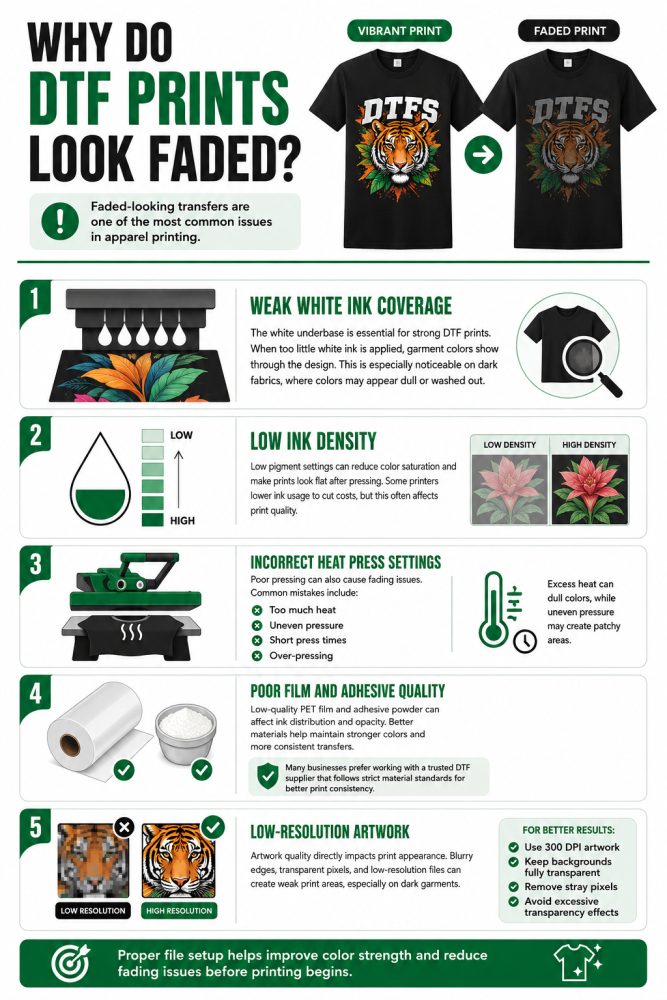
Why Do DTF Prints Look Faded?
One of the most common customer complaints in apparel printing is faded-looking transfers. Many people ask, why do DTF prints look faded even when the artwork appears perfect on screen?
The answer usually involves a combination of production issues.
Weak White Ink Coverage
The white underbase is the foundation of every DTF print. If the printer applies too little white ink, the garment color will show through the design.
This issue is especially noticeable on black or dark-colored apparel. Reds may look dull, whites may appear gray, and vibrant graphics can lose their depth.
Weak white coverage is one of the biggest causes of DTF transfer fading during production.
Low Ink Density
Another common issue is insufficient ink density. When printers use low pigment settings, the transfer cannot produce strong color saturation.
Low-density prints often appear flat or washed out after pressing. This problem may also occur when printers attempt to reduce ink usage to lower costs.
Professionals like DTFS focus on balanced ink density because excessive savings on ink can reduce overall print quality.
Incorrect Heat Press Settings
Even high-quality transfers can look faded if the pressing process is incorrect.
Common problems include:
-
Too much heat
-
Uneven pressure
-
Short pressing times
-
Over-pressing the transfer
Excessive heat can flatten colors and reduce visual sharpness. Uneven pressure may also create patchy areas within the design.
Poor Film and Adhesive Quality
Low-grade PET film and cheap adhesive powder often contribute to major DTF transfer quality issues. Inferior materials may not hold ink evenly, which affects overall opacity.
Better-quality films typically provide smoother ink distribution and improved color performance. Reliable adhesive powder also helps maintain consistent transfer bonding.
This is one reason many apparel businesses prefer working with a trusted dtf company that maintains strict material standards instead of relying on inconsistent suppliers.
Low-Resolution Artwork
Artwork quality also affects opacity more than many people realize.
Design files with transparent pixels, blurry edges, or low resolution can create weak print areas. These imperfections become more noticeable after pressing, especially on dark garments.
For best results:
-
Use 300 DPI artwork
-
Keep backgrounds fully transparent
-
Avoid unnecessary semi-transparent effects
-
Clean stray pixels before printing
Proper file preparation improves color strength and helps reduce fading problems before production even begins.
Understanding DTF Ink Opacity Problems
Many print shops focus only on artwork quality while ignoring the ink system itself. However, most serious DTF ink opacity problems begin during the printing process. Even a well-designed graphic can look weak if the printer setup is not optimized properly.
DTF printing depends on multiple ink layers working together. The CMYK colors provide the visual design, while the white underbase creates coverage and brightness. If either layer becomes inconsistent, the entire transfer can appear faded.
At DTFS, opacity control starts with printer calibration because small variations in white ink density can dramatically affect final print quality.
The Importance of White Ink in DTF Printing
White ink is often considered the backbone of DTF production. Without it, colors lose their vibrancy on dark garments.
The white layer performs several important functions:
-
Blocks the garment color underneath
-
Enhances brightness and saturation
-
Supports adhesive powder bonding
-
Improves detail visibility
Most professional DTF white inks contain titanium dioxide, which gives the ink its strong covering power. Lower-quality inks usually contain less pigment, leading to weak opacity and uneven results.
This is why many businesses dealing with DTF white ink issues notice dull prints, gray whites, or inconsistent coverage across large designs.
Common RIP Software Mistakes
RIP software controls how the printer lays down ink. Incorrect settings often create opacity problems even when the equipment itself is functioning correctly.
Some of the most common issues include:
Incorrect White Ink Percentage
If the white ink percentage is set too low, the transfer may not fully block dark fabrics. The final print can appear thin or washed out.
Poor Choke Settings
A choke slightly shrinks the white underbase so it does not peek out around the colored design. However, too much choke can weaken edge coverage and reduce opacity.
Excessive Ink Limits
Applying too much ink may sound helpful, but it can actually create muddy graphics and stiff prints. Proper balance is more important than maximum ink usage.
Professional operators regularly test and adjust RIP settings to maintain consistent opacity across different garment types.
DTF Transfer Opacity and Transparent Artwork
One of the biggest misunderstandings in DTF printing involves transparency effects. Many designers create soft glows, shadows, or faded gradients without realizing how DTF printers interpret these elements.
Unlike screen printing, DTF systems struggle with semi-transparent pixels.
Why Transparent Effects Cause Problems
When artwork contains partial transparency, the RIP software still applies white ink underneath those areas. This often creates:
-
White halos around graphics
-
Muddy edges
-
Uneven fades
-
Patchy transitions
As a result, the print may look very different from the original digital design.
This is another reason why people frequently ask why do DTF prints look faded after production. The issue is not always the printer itself. Sometimes the artwork preparation is the real problem.
How Halftones Improve Opacity
Instead of using transparent fades, professional designers often convert gradients into halftones.
Halftones use tiny solid dots to simulate fading effects while maintaining proper opacity. This method allows the garment color to show through naturally without confusing the printer.
Benefits of halftones include:
-
Cleaner edges
-
Better opacity consistency
-
Softer print feel
-
Improved durability
For large commercial projects, halftones also help reduce heavy ink buildup while keeping the design visually smooth.
How to Fix Faded DTF Prints
Businesses dealing with recurring opacity issues often search for ways to how to fix faded DTF prints without replacing their entire setup. In many cases, several small improvements can produce major results.
Improve White Ink Maintenance
White ink settles faster than standard CMYK inks because of its heavy pigment content. Poor circulation can cause clogged print heads and uneven coverage.
Daily maintenance should include:
-
Regular ink agitation
-
Print head cleaning
-
Nozzle checks
-
Proper storage conditions
Routine maintenance helps restore DTF white ink issues before they affect production quality.
Use Higher-Quality Materials
Cheap consumables often create long-term production problems.
Using premium PET film and reliable adhesive powder improves:
-
Ink consistency
-
Adhesive bonding
-
Color vibrancy
-
Overall transfer durability
Many print providers also notice fewer spoilage issues after upgrading their film and powder systems.
Optimize Artwork Preparation
Good artwork preparation reduces many common opacity issues before printing even begins.
Best practices include:
-
Designing at 300 DPI
-
Removing hidden transparent pixels
-
Avoiding unnecessary glow effects
-
Converting gradients into halftones
Clean files help produce sharper prints and reduce unwanted white edge problems.
Perform Test Presses Before Large Orders
Testing transfers on actual garments helps identify issues early. This is especially important before running a Bulk dtf transfer order for customers.
A simple sample press allows printers to evaluate:
-
Color brightness
-
White coverage
-
Heat consistency
-
Overall print feel
Testing multiple garment colors also helps confirm that the transfer performs consistently across different fabrics.
Many production teams now combine testing with efficient Gangsheet printing workflows to reduce waste while maintaining quality standards.
DTF Transfer Fading: How to Prevent Long-Term Print Quality Problems
Preventing DTF transfer fading is just as important as fixing opacity issues during production. A transfer may look vibrant immediately after pressing, but poor curing or improper materials can cause colors to fade quickly after washing.
Long-lasting DTF prints depend on consistency throughout the entire process. Every stage matters, from artwork preparation to final curing.
At DTFS, maintaining durability is part of achieving professional print quality because customers expect transfers to remain bright even after repeated wear.
Proper Curing Matters
Curing is one of the most overlooked areas in DTF printing. If the adhesive powder does not melt correctly, the transfer may fail prematurely.
Under-cured transfers can develop:
-
Weak adhesion
-
Cracking
-
Dull colors
-
Poor wash durability
Over-curing creates problems as well. Excessive heat may damage the adhesive layer and flatten the print appearance.
Maintaining proper curing temperature and timing helps preserve both opacity and flexibility.
Storage Conditions Affect Print Performance
Environmental conditions can also impact transfer quality before pressing even begins.
Humidity and temperature fluctuations may affect:
-
Film stability
-
Powder adhesion
-
Ink consistency
-
Pressing performance
Transfers should always be stored in a cool and dry environment. Proper storage reduces the risk of production defects and improves consistency during large print runs.
Washing Instructions Help Prevent Fading
Even high-quality transfers can lose brightness if garments are not washed correctly.
Recommended care instructions include:
-
Wash garments inside out
-
Use cold water when possible
-
Avoid harsh detergents
-
Do not use high heat drying
Educating customers about proper garment care helps preserve print vibrancy for a longer period.
How Gang Sheet Layouts Impact Opacity
Many print shops focus heavily on printer settings but overlook layout planning. However, proper Gang Sheet Printing organization can improve both efficiency and print consistency.
Poorly arranged gang sheets may create uneven heat distribution and inconsistent pressure during pressing.
Benefits of Organized Gang Sheets
Well-planned layouts help:
-
Reduce wasted film space
-
Maintain even transfer spacing
-
Improve workflow efficiency
-
Support more consistent print results
Efficient layouts also reduce production costs during large-volume jobs.
Businesses handling multiple orders often combine organized Gangsheet printing with automated workflows to improve turnaround times without sacrificing print quality.
Avoid Overcrowded Layouts
Placing designs too close together may create production problems during trimming and pressing.
Overcrowded sheets can lead to:
-
Heat inconsistencies
-
Transfer shifting
-
Uneven curing
-
Damaged edges
Leaving enough spacing between designs improves handling and reduces spoilage during production.
Choosing the Right DTF Printing Partner
Not all DTF providers maintain the same quality standards. Some suppliers reduce costs by lowering ink density or using low-grade consumables. While this may reduce short-term expenses, it often leads to long-term print problems.
Working with a reliable production partner helps businesses avoid recurring DTF transfer quality issues.
What to Look for in a Reliable Provider
A dependable DTF supplier should offer:
-
Consistent white ink coverage
-
Premium PET film
-
Reliable adhesive powder
-
Accurate color reproduction
-
Quality control testing
A professional production process also reduces the risk of fading, cracking, and poor opacity.
Many apparel brands prefer partnering with a trusted dtf company because consistent quality directly affects customer satisfaction and repeat business.
Why Quality Materials Matter
Premium materials improve:
-
Color vibrancy
-
Opacity strength
-
Transfer flexibility
-
Wash durability
Low-cost materials may initially appear acceptable, but they often fail under regular wear and washing conditions.
Using high-quality transfers helps businesses protect their reputation while reducing costly reprints.
Scaling Production Without Sacrificing Quality
As apparel businesses grow, maintaining consistent opacity across large orders becomes more challenging. Production speed should never compromise print quality.
This is especially important for brands processing frequent custom apparel requests or large promotional campaigns.
Reliable suppliers help simplify this process through:
-
Consistent production standards
-
Accurate color management
-
Fast turnaround times
-
Professional file handling
Businesses looking to Buy custom dtf transfers often prioritize consistency because even small quality issues become expensive at scale.
A detailed DTF transfer guide can also help new businesses understand proper artwork setup, transfer handling, and pressing techniques before moving into larger production runs.
Final Thoughts
Understanding DTF transfer opacity is essential for producing vibrant, professional-quality apparel. Most fading problems come from avoidable production mistakes such as weak white ink coverage, poor artwork preparation, incorrect curing, or low-grade materials.
Strong opacity creates sharper details, brighter colors, and better durability across different garment types. It also reduces customer complaints and helps businesses maintain a more professional image.
By improving printer settings, maintaining white ink properly, using quality materials, and following structured production workflows, businesses can significantly reduce common opacity issues.
For brands focused on consistent results, working with experienced providers like DTFS can help streamline production while maintaining high-quality transfer performance across every order.
FAQs
What is DTF transfer opacity?
DTF transfer opacity refers to how well the printed design blocks the garment color underneath. High opacity creates bright, vibrant prints with solid coverage, especially on dark apparel. Low opacity can make designs appear faded or washed out.
Why do DTF prints look faded after pressing?
DTF prints usually look faded because of weak white ink coverage, low ink density, poor curing, incorrect heat press settings, or low-quality film and powder. Improper artwork preparation can also contribute to dull-looking transfers.
How to fix faded DTF prints?
To fix faded DTF prints, improve white ink density, use high-quality PET film and adhesive powder, maintain proper curing temperatures, and prepare artwork correctly at 300 DPI. Regular printer maintenance also helps prevent opacity problems.
What causes DTF white ink issues?
Common DTF white ink issues include clogged print heads, poor ink circulation, low-quality white ink, and incorrect RIP software settings. These problems can lead to uneven coverage, grayish whites, and inconsistent print opacity.
Does gang sheet layout affect DTF print quality?
Yes, poor Gang Sheet Printing layouts can affect heat distribution, pressure consistency, and transfer alignment. Properly spaced gang sheets help improve workflow efficiency while maintaining consistent print quality across multiple designs.