
September 22, 2026 · Connor McDonnell
How to Use the DTF Gang Sheet Builder to Lower Cost per Transfer
A well-planned gang sheet can reduce the cost of each DTF transfer without lowering print quality. The savings come from using the printable area efficiently, standardizing artwork sizes, reducing empty space, and ordering a quantity that matches real demand. The easiest way to plan this process is with a DTF gang sheet builder.
A builder lets you organize several designs on one sheet before you order. It helps you see whether your artwork fits, identify wasted space, repeat popular graphics, and create a more predictable production cost. When paired with a clear pricing method, it becomes more than a design tool. It becomes a purchasing and margin-management tool for a growing apparel business.
This guide explains how to use a DTF gang sheet builder, how a DTF gang sheet calculator can support cost planning, how to arrange a DTF gang sheet, how to create an efficient DTF gang sheet layout, and how to maximize a DTF gang sheet without creating artwork, sorting, or pressing problems.
What Is a DTF Gang Sheet Builder?
A DTF gang sheet builder is a tool that allows you to place multiple transfer designs onto a shared printable sheet. The designs can include logos, illustrations, names, numbers, chest prints, sleeve graphics, labels, and other artwork needed for an apparel order.
Instead of purchasing every graphic as a separate transfer, you use one sheet to organize multiple pieces. This can lower the average cost when the sheet is filled efficiently. It can also simplify purchasing when a print shop needs several related designs for the same customer, event, brand, team, or collection.
The builder is most valuable before the order is submitted. It gives you an opportunity to check the artwork arrangement rather than discovering after production that too much space was left unused. A good builder workflow also makes it easier to document the final sheet and repeat the same order later.
The Order Transfers is designed for buyers who want to organize transfers for production. The page states that the product is printed directly by DTFS.co, never outsourced, and shipped from the United States. Confirm the current product details, pricing, availability, and ordering requirements on the live page before submitting an order.
DTF Gang Sheet Builder: Start With the Order, Not the Sheet
The most common planning mistake is opening a builder and placing random artwork until the sheet looks full. A better process begins with the order requirements.
First, list the garments or products that need transfers. Record the design name, intended print location, finished width or height, number of copies, and garment color. Separate confirmed customer orders from speculative inventory.
For example, a wholesale apparel order may require:
• 50 full-front brand graphics
• 50 left-chest logos
• 25 sleeve graphics
• 20 names or numbers
• 10 sample transfers for future sales
This list gives you a production target. It also prevents you from filling the sheet with designs that do not have a confirmed use.
Next, group designs by finished size. Similar sizes are easier to arrange, easier to cut, and easier to inventory. Common groups include left-chest logos, full-front prints, back graphics, sleeve prints, youth sizes, and accessory transfers.
Finally, identify which designs can be repeated. Repetition often improves sheet utilization because identical shapes can be nested more efficiently than unrelated artwork.
DTF Gang Sheet Calculator: Calculate Cost Before Ordering
A DTF gang sheet calculator can help estimate the cost per usable transfer.
The basic formula is straightforward:
Cost per usable transfer = total gang-sheet cost ÷ number of usable transfers
For a more accurate business calculation, use the delivered cost:
Landed cost per usable transfer = (sheet price + shipping + fees) ÷ usable transfer quantity
Suppose your total order cost is $68 after shipping and the sheet contains 40 usable transfers. Your landed cost is $1.70 per transfer. If the sheet contains only 25 usable transfers, the cost rises to $2.72 per transfer.
This difference shows why empty space matters. The sheet price has not changed, but the economics have.
For a completed garment, add the additional production costs:
Finished product cost = transfer cost + blank garment + pressing labor + packaging + transaction fees
If a transfer costs $1.70, the blank shirt costs $4.00, pressing labor is $1.00, packaging is $0.35, and payment fees are $0.40, the direct cost is $7.45 before overhead and profit.
A calculator can also compare different sheet scenarios. For example, compare one large sheet against two smaller sheets. The large sheet may have a lower cost per transfer but require more upfront cash. The smaller sheets may be easier to handle and reduce inventory risk. Choose the scenario that gives you the best combination of unit economics, cash flow, and order certainty.
How to Arrange a DTF Gang Sheet Efficiently
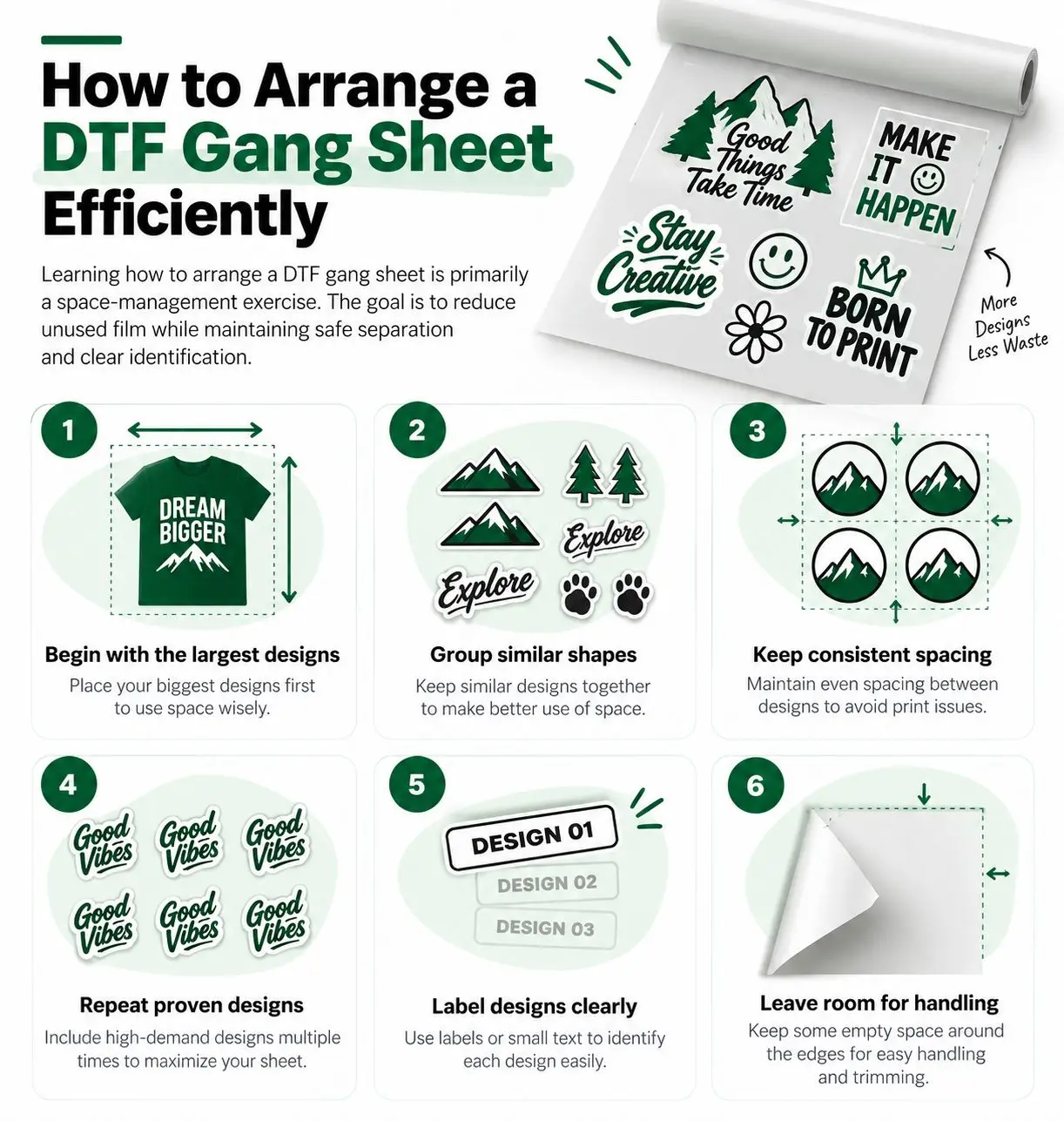
Learning how to arrange a DTF gang sheet is primarily a space-management exercise. The goal is to reduce unused film while maintaining safe separation and clear identification.
Begin with the largest designs
Place the largest graphics first. Large artwork determines how the remaining space can be used. If you start with small logos, you may create narrow gaps that cannot accept a larger design later.
Group similar shapes
Place wide designs with other wide designs and tall designs with other tall designs. Similar shapes can often fit together more efficiently than a random mixture of rectangles.
Keep consistent spacing
Do not push artwork together simply to fill every possible gap. Transfers need enough separation for cutting, handling, and identification. Follow the supplier's artwork and spacing requirements and confirm them before finalizing the order.
Repeat proven designs
If a design is used 50 times, place the required copies together. Repetition makes the sheet easier to inspect and reduces the chance of sending the wrong artwork to production.
Label designs clearly
Use simple file names or visual labels that help you identify each transfer after printing. This is especially important when one sheet contains multiple customer orders.
Leave room for handling
A sheet that is theoretically full may be difficult to cut or sort. Account for practical handling rather than focusing only on mathematical area utilization.
DTF Gang Sheet Layout: The Difference Between Full and Efficient
A DTF gang sheet layout should be judged by usable output, not by how crowded it appears.
An efficient layout balances several goals:
1 High printable-area utilization.
2 Safe separation between designs.
3 Clear artwork identification.
4 Easy cutting and sorting.
5 Consistent finished sizes.
6 Low risk of damaged or misplaced transfers.
Consider two layouts with the same sheet price. Layout A contains 30 transfers but has large empty spaces. Layout B contains 42 transfers with consistent spacing and clear labels. If both layouts produce saleable artwork, Layout B has the lower average transfer cost.
However, maximum density is not always the best design. A crowded layout can create cutting problems, make artwork difficult to identify, and increase handling time. For a commercial print shop, labor is part of cost. A layout that saves a small amount of film but adds significant sorting time may not improve profit.
Use a visual review before ordering. Check the design count, dimensions, orientation, spacing, and labels. If a graphic looks too close to another design, move it even if the software allows the placement.
How to Maximize a DTF Gang Sheet Without Overbuying
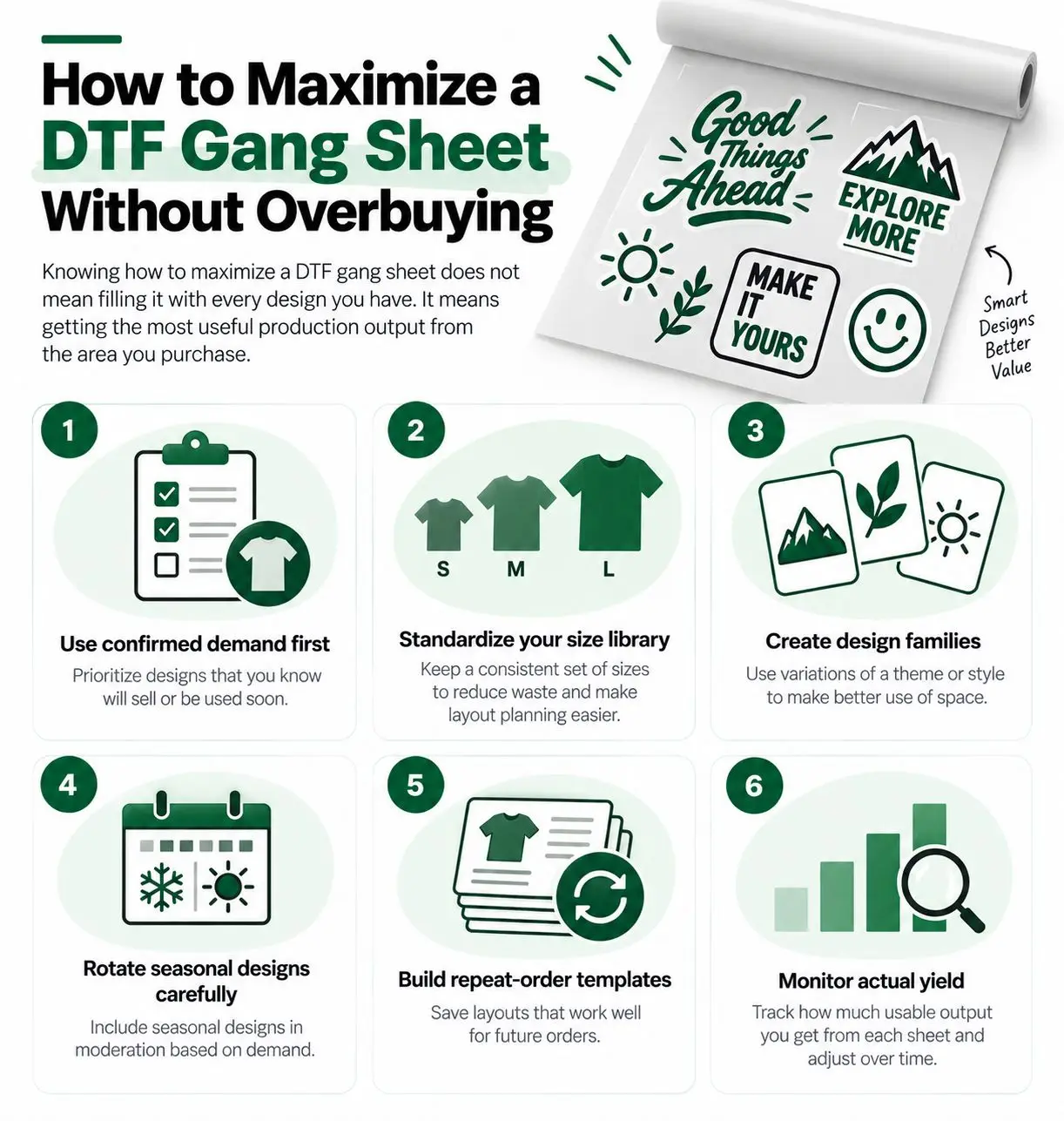
Knowing how to maximize a DTF gang sheet does not mean filling it with every design you have. It means getting the most useful production output from the area you purchase.
Use confirmed demand first
Start with designs attached to confirmed orders. This gives each area of the sheet a clear purpose. Only add speculative designs when they are evergreen and likely to sell.
Standardize your size library
Create approved sizes for common products. For example, define a left-chest size for adult shirts, a full-front size, a sleeve size, and a youth size. Standard sizes make future gang-sheet planning faster and reduce inconsistent output.
Create design families
If you sell a collection with several related graphics, create a design family with consistent dimensions and naming. These designs can often be arranged together more efficiently.
Rotate seasonal designs carefully
Seasonal artwork can sell quickly, but its useful life may be short. Do not use a large amount of gang-sheet space for a seasonal design unless demand is already visible. Use smaller test runs before expanding.
Build repeat-order templates
Save the layout for recurring customers. A saved template lets you replace quantities or add new designs without starting from zero. It also creates consistency across repeat orders.
Monitor actual yield
After production, record how many usable transfers the sheet produced. Include damaged pieces, misprints, and transfers that were difficult to cut or apply. This real-world yield should inform your next order.
Artwork Preparation Before Using the Builder
The builder cannot fix every artwork problem. Prepare files before uploading them.
Use a transparent background when the design requires one. Confirm that the artwork is at the intended final size. Check small text, fine lines, gradients, and thin outlines at the size that will actually be printed. Artwork that looks clear on a large monitor may lose detail when reduced.
Keep important design elements away from the edge of the transfer. A small margin can protect the visual balance and reduce the chance of an edge being clipped during cutting or application.
Use a consistent file-naming system. A useful filename may include the customer, design, placement, size, and quantity.
For example: BrandName_LeftChest_Adult_4in_50pcs.png
Before ordering, compare each filename with the production list. This simple step reduces errors when several customers share one gang sheet.
For additional sizing and product guidance, review the DTFS DTF Transfer by Size page. For wholesale production and bulk-order planning, see DTFS Bulk & Wholesale Printing.
Measuring Gang Sheet Efficiency
You can track gang-sheet efficiency with several simple metrics.
Area utilization
Area utilization is the percentage of the printable area occupied by artwork. It can be estimated as:
Area utilization = artwork area ÷ printable sheet area × 100
This metric is useful, but it should not be the only measure. A crowded sheet may show high utilization while producing a poor handling experience.
Usable transfer yield
Usable yield is the number of saleable transfers produced from the sheet. This is often more useful than area utilization because it connects the layout to revenue.
Cost per usable transfer
Divide the delivered order cost by the number of usable transfers. Track this by design size and order type when possible.
Waste rate
Record transfers that cannot be used because of printing defects, incorrect files, damage, or excess inventory. Waste reduces the true value of the order.
Handling time
Measure the time needed to cut, sort, label, and apply the transfers. If a layout reduces sheet cost but doubles handling time, it may not be profitable.
Common DTF Gang Sheet Layout Mistakes
One common mistake is placing artwork at inconsistent sizes. This makes inventory difficult and can create customer dissatisfaction when similar designs look noticeably different.
Another mistake is leaving too much space between designs. Safe spacing is necessary, but excessive gaps reduce the number of usable transfers. Use the builder to identify areas that could accommodate another small logo or label.
A third mistake is rotating artwork without considering the cutting and pressing workflow. Rotation may improve space utilization, but it can make labels or directional designs harder to handle. Use rotation only when the final production process remains clear.
Some buyers also combine too many unrelated customer orders. This may reduce film waste but increase sorting risk. Use clear labels and separate order groups whenever possible.
Finally, many businesses fail to review the final layout at actual print size. A design that looks correct at a thumbnail view may be too small for the garment or too detailed for reliable application.
When a DTF Gang Sheet Builder Saves the Most Money
A builder typically creates the greatest savings in four situations.
First, it helps when you have multiple small and medium designs. These graphics can often share space efficiently.
Second, it helps when you have repeat orders. A saved layout reduces planning time and makes it easier to maintain consistent pricing.
Third, it helps when several products use related artwork. A clothing brand may need front logos, back graphics, sleeve marks, and labels for one collection.
Fourth, it helps when you are comparing order scenarios. You can test whether a large sheet, several medium sheets, or a mixed-design order produces the best cost per usable transfer.
The savings are smaller when you have only one oversized design or no confirmed use for the remaining sheet area. In those cases, choose a size and quantity that match your real order.
Building a Wholesale Workflow Around the Tool
A gang sheet builder becomes more valuable when it is part of a repeatable wholesale process.
Start with a customer order form that captures design files, sizes, placements, quantities, garment colors, and deadlines. Review the artwork before placing it into the builder. Create the layout, record the expected yield, and calculate the landed cost. Save the approved layout and send a proof when appropriate.
After production, inspect the transfers before pressing. Count the pieces, check the design quality, and separate each customer's order. Record any issues so the next layout or supplier conversation is based on evidence.
For recurring bulk buyers, create pricing tiers that reflect actual cost and labor. A 100-piece order should be more efficient than a ten-piece order, but the discount should not eliminate your profit. Link the bulk workflow to the DTFS Bulk & Wholesale Printing page when customers need larger production support.
Conclusion
A DTF gang sheet builder can lower cost per transfer when it is used as part of a complete production and pricing system. Start with confirmed demand, prepare artwork at the correct size, arrange large designs first, maintain practical spacing, and calculate the landed cost per usable transfer.
Use a DTF gang sheet calculator to compare order scenarios. Learn how to arrange a DTF gang sheet so the sheet is easy to cut and sort. Build a clear DTF gang sheet layout that balances density with production quality. Most importantly, understand how to maximize a DTF gang sheet by filling it with useful, saleable artwork rather than unnecessary inventory.
When you are ready to plan an order, visit the Order Transfers. For size-based product planning, visit DTFS DTF Transfer by Size. For larger production requirements, explore DTFS Bulk & Wholesale Printing.
Frequently Asked Questions
What is the main purpose of a DTF gang sheet builder?
Its main purpose is to organize multiple transfer designs on one sheet so you can improve space utilization, reduce waste, and plan the order before production.
How does a DTF gang sheet calculator reduce costs?
It converts the total delivered sheet cost into a cost per usable transfer. This makes it easier to compare layouts, quantities, suppliers, and finished-product margins.
How should I arrange a DTF gang sheet?
Place the largest designs first, group similar shapes, use consistent spacing, repeat proven designs, label each artwork group, and leave enough room for cutting and handling.
What makes an efficient DTF gang sheet layout?
An efficient layout uses printable area well while maintaining safe spacing, clear identification, easy cutting, consistent sizes, and a low handling burden.
How can I maximize a DTF gang sheet?
Use confirmed demand first, standardize common sizes, repeat popular artwork, save templates for repeat orders, and measure actual usable yield after production.
Should every gang sheet be filled completely?
No. A full sheet is not always efficient if the extra designs are unlikely to sell or make cutting and sorting difficult. Maximize useful output, not just occupied area.