


In DTF printing, the quality of your artwork is non-negotiable. It determines whether your print is sharp, clean, detailed, and colorful, or it’s blurry, faded, and low-quality. That’s when choosing the right option among the best DTF design tools becomes a critical decision.
It is often overwhelming to choose the right one because so many design tools are available in the market. From professional high-grade design software like Adobe Illustrator to intuitive drag-and-drop tools like Canva, there are plenty of options to choose from.
But instead of fancy features and functionalities that you will rarely use, the right choice depends on your experience, comfort, and DTF artwork requirements. Instead of chasing features and complex functionality, look for a design tool that fits your workflow and your skill level.
In this blog, we are going to discuss the best design tools for creating DTF-ready artwork, their features, pros and cons, and tips for choosing the right option. These tools help design quality artworks and print custom DTF transfers that apply seamlessly and provide the best output.
Top DTF Artwork Design Software that are Widely Used
The following list shows the best tools for DTF printing artwork that most people use today. Although each tool has its own strengths, they vary with the level of complexity and functionality. From designing a single artwork to creating designs for gang sheet printing, these tools are fully featured to prepare designs for your DTF project.
Adobe Photoshop
It is an artist’s goldmine and widely used for graphics and images. Adobe Photoshop is a raster-based image editing tool, offering advanced capabilities to edit and play around with images. Photoshop is an undisputed king for raster-based image editing and is considered the industry standard.
It is an impressive tool to create designs with fine details and vibrant colors. You can work with a variety of file formats in Photoshop, including PSD, JPEG, and PNG. It is one of the best DTF design tools to create a single design or build a gang sheet.
But it is a professional tool with intricate functionality that has a steep learning curve for beginners and non-artist users. So, if you have no experience in graphics design, it might be tricky to create designs for your DTF printing project.
Key features to support DTF artwork design
-
Supports 300+ DPI workspaces
-
Seamless switching between RGB, CMYK, and Spot Colors
-
Advanced masking tools to cleanly isolate graphics
-
Imports and scales vectors smoothly for sharper complex logo edges
-
Creates dedicated underbase channels to tell the printer where to add white ink
Who’s it best for?
It’s best for professional designers who want to create gang sheets or single designs.
|
Pros |
Cons |
|
Excellent for high-resolution raster artwork |
Not ideal for vector-based logo creation |
|
Strong color correction and layer controls |
Large files can slow performance |
|
Supports 300 DPI DTF print preparation |
Subscription cost can be expensive |
|
Great for photo-based DTF designs |
Requires advanced design knowledge |
|
Wide plugin and brush compatibility |
Scaling raster files may reduce quality |
Adobe Illustrator
If you want vector-based graphics, then Adobe Illustrator is one of the most reliable tools. It helps you design logos and graphics that remain scalable and sharp at any size. It is best-suited for typography, logos, and intricate designs that require utmost precision. You can rely on this DTF artwork design software to create high-resolution and detailed images or graphics to print on your shirt or other garment.
This is the right choice for businesses or creators who focus on utter precision in their logos and graphics. Built-in features of this tool make artwork design a breeze. However, it has a higher learning curve than Adobe Photoshop and is not the right tool for beginners or people with no design skills.
Key features to support DTF artwork design
-
Keeps artwork and text perfectly crisp at any size
-
Produces ultra-sharp paths to prevent white adhesive from bleeding past the design
-
Creates clean, named color swatches required by RIP software
-
Locks graphics to precise millimeter dimensions to fit the exact hat patch print
-
Maintains fonts as editable vectors for quick name, number, or slogan changes
Who is it best for?
Professionals and designers who need scalable graphics
|
Pros |
Cons |
|
Ideal for vector artwork and logo design |
Steeper learning curve for beginners |
|
Artwork scales without losing quality |
Less effective for detailed photo editing |
|
Excellent for clean lines and typography |
Subscription-based pricing |
|
Perfect for small DTF transfer designs |
Can feel complex for simple edits |
|
Supports precise path and shape control |
Requires additional software for raster effects |
GIMP
GIMP is one of the most popular free DTF artwork design software options for beginners and small businesses. It is an open-source raster image editing tool that offers powerful editing capabilities for graphics, transparent PNGs, and photo-based artwork. Many startups use GIMP as an affordable alternative to premium DTF design tools.
It supports layered editing, color correction, masking, and high-resolution image preparation for DTF printing. GIMP works well for users who want to create DTF-ready artwork without paying subscription fees. However, its interface feels less polished compared to Adobe products, and some advanced print workflow features are limited.
Key features to support artwork preparation for DTF printing
-
Supports high-resolution 300 DPI artwork creation
-
Advanced layer masking and transparency editing
-
Compatible with PNG, PSD, JPEG, and TIFF formats
-
Custom brushes and plugin support
-
Strong photo editing and background removal tools
Who’s it best for?
Beginners, startups, and small print shops looking for free design software for DTF printing.
|
Pros |
Cons |
|
Completely free and open-source |
Interface can feel outdated |
|
Good for raster image editing |
Limited CMYK workflow support |
|
Supports transparent PNG exports |
Fewer advanced print features |
|
Lightweight compared to Photoshop |
Learning curve for beginners |
|
Strong plugin compatibility |
Not ideal for complex vector work |
Canva
Canva is one of the easiest DTF-ready artwork tools for beginners with no graphic design experience. It uses a drag-and-drop interface that simplifies social graphics, logos, typography, and simple apparel artwork creation.
Although Canva is not a professional-grade DTF design platform, it is widely used for quick mockups, basic shirt graphics, and simple branding visuals. It works best for straightforward designs rather than detailed production artwork.
Key features to support DTF artwork design
-
Beginner-friendly drag-and-drop editor
-
Cloud-based access from any device
-
Thousands of templates and typography options
-
Easy PNG export with transparent background
-
Quick resizing for different print placements
Who’s it best for?
Small business owners, POD sellers, and beginners creating basic DTF-ready artwork.
|
Pros |
Cons |
|
Extremely beginner-friendly |
Limited advanced editing tools |
|
Fast design workflow |
Weak vector editing capabilities |
|
Huge template library |
Less control over print precision |
|
Easy transparent PNG exports |
CMYK support is limited |
|
Great for simple apparel graphics |
Not ideal for detailed DTF production |
Inkscape
Inkscape is a powerful open-source vector editing software widely used for scalable logos, typography, and line-based graphics. It is one of the best free design software for DTF printing for users focused on vector artwork.
The software allows users to create sharp graphics that remain clean at any print size, making it excellent for logos and small DTF transfer designs. However, its interface can feel technical for first-time users.
Key features to support create DTF-ready artwork
-
Professional vector path editing tools
-
Infinite scalability without quality loss
-
SVG, EPS, PDF, and AI compatibility
-
Precise node and typography controls
-
Strong line and shape accuracy for DTF printing
Who’s it best for?
Designers and creators who need free vector-based DTF design tools.
|
Pros |
Cons |
|
Completely free vector software |
Interface feels less modern |
|
Excellent for logo creation |
Slower performance on large files |
|
Scalable graphics without blur |
Steeper learning curve |
|
Strong typography controls |
Limited raster editing features |
|
Great for line precision |
Fewer industry integrations |
CorelDRAW
When it comes to the best tools for DTF printing for vector illustration and print production, CorelDRAW is in the list. It is widely used in sign-making, apparel decoration, embroidery digitizing, and professional print shops.
Its precision tools make artwork preparation for DTF printing highly efficient, especially for typography-heavy graphics and scalable logos. Many production environments prefer CorelDRAW because of its strong print workflow controls.
Key features to support DTF artwork design
-
Advanced vector illustration capabilities
-
Strong color management controls
-
Excellent typography and layout tools
-
High-precision alignment and scaling
-
Supports multiple professional print file formats
Who’s it best for?
Professional print shops, apparel decorators, and experienced production designers.
|
Pros |
Cons |
|
Excellent print production workflow |
Paid software subscription |
|
Strong vector editing capabilities |
Requires design experience |
|
Reliable color management tools |
Interface can feel complex |
|
Great typography precision |
Limited photo editing tools |
|
Widely used in apparel production |
Higher system resource usage |
Sketch
Sketch is a lightweight vector-based design platform commonly used for UI and digital design projects. While not traditionally built for apparel printing, some creators use it for clean vector-based DTF graphics and typography layouts.
Its simplicity and modern interface make it useful for minimalist branding artwork and logo creation. However, it lacks many advanced print production features required for professional DTF workflows.
Key features to support DTF-ready artwork tools
-
Lightweight vector editing workflow
-
Clean typography and layout tools
-
Fast interface with simple controls
-
Strong symbol and reusable component system
-
Smooth SVG export support
Who’s it best for?
Digital creators and minimalist designers creating simple vector artwork.
|
Pros |
Cons |
|
Clean and modern interface |
Mac-only software |
|
Easy vector editing workflow |
Limited print production tools |
|
Lightweight and fast |
Weak raster editing support |
|
Good typography controls |
Not ideal for complex DTF workflows |
|
Smooth SVG exports |
Less common in apparel printing |
Photopea
Photopea is a browser-based image editing software that closely resembles Photoshop. It has become a popular free alternative for users who need quick access to DTF artwork design software without installing heavy desktop applications.
It supports PSD editing, transparent PNG exports, and layered image creation directly in the browser. While it lacks some advanced professional features, it performs surprisingly well for basic DTF artwork preparation.
Key features to support artwork preparation for DTF printing
-
Browser-based editing with no installation
-
Supports PSD, PNG, JPEG, and SVG files
-
Layered editing and masking tools
-
Transparent background export support
-
Lightweight editing for quick DTF designs
Who’s it best for?
Freelancers, beginners, and quick-edit users needing browser-based DTF design tools.
|
Pros |
Cons |
|
Free browser-based software |
Requires internet connection |
|
Similar interface to Photoshop |
Limited advanced functionality |
|
Supports PSD file editing |
Performance depends on browser |
|
Quick transparent PNG exports |
Not ideal for large production files |
|
Easy accessibility from any device |
Fewer professional print controls |
Tips for Choosing the Right DTF Artwork Design Software
Choosing the right design software for DTF printing can significantly improve print quality, workflow efficiency, and overall production consistency. Every DTF project requires accurate artwork preparation, proper resolution handling, color management, and scalable design capabilities.
However, not all software offers the same features or flexibility. Some DTF design tools are built for professional vector artwork, while others focus on beginner-friendly editing and quick graphic creation.
The ideal software depends on your production needs, technical skills, budget, and the type of artwork you create most often. A professional print shop handling complex gang sheet printing may require advanced vector and color-management tools, while a beginner selling simple shirt designs online may benefit more from lightweight or browser-based software.
When selecting software to create DTF-ready artwork, focus on practical production features instead of just design appearance. Artwork that looks impressive on screen still needs to print cleanly, maintain sharp edges, and preserve detail after transfer and curing.
Below are some important factors to consider when choosing the best DTF artwork design software for your workflow.
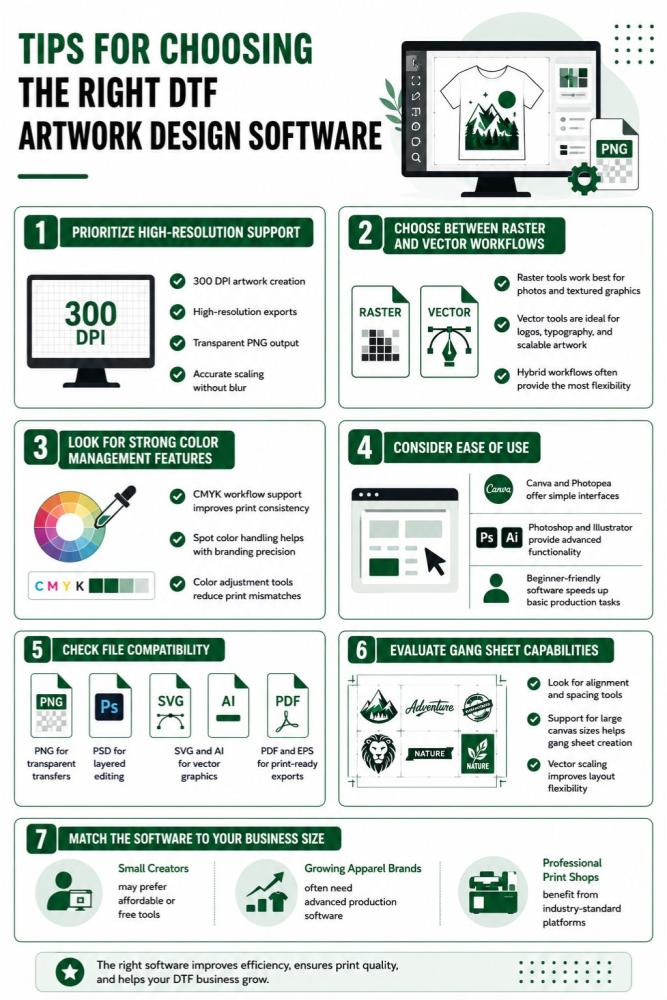
Prioritize High-Resolution Support
DTF printing requires clean, sharp artwork preparation.
Your software should support:
-
300 DPI artwork creation
-
High-resolution exports
-
Transparent PNG output
-
Accurate scaling without blur
Choose Between Raster and Vector Workflows
Different projects require different design approaches.
-
Raster tools work best for photos and textured graphics
-
Vector tools are ideal for logos, typography, and scalable artwork
-
Hybrid workflows often provide the most flexibility
Look for Strong Color Management Features
Color accuracy plays a major role in DTF printing quality.
-
CMYK workflow support improves print consistency
-
Spot color handling helps with branding precision
-
Color adjustment tools reduce print mismatches
Consider Ease of Use
Some DTF design tools are built for professionals, while others are easier for beginners.
-
Canva and Photopea offer simple interfaces
-
Photoshop and Illustrator provide advanced functionality
-
Beginner-friendly software speeds up basic production tasks
Check File Compatibility
Good software should support common DTF production formats.
-
PNG for transparent transfers
-
PSD for layered editing
-
SVG and AI for vector graphics
-
PDF and EPS for print-ready exports
Evaluate Gang Sheet Capabilities
If you regularly print multiple designs, efficient layout control becomes important.
-
Look for alignment and spacing tools
-
Support for large canvas sizes helps gang sheet creation
-
Vector scaling improves layout flexibility
Match the Software to Your Business Size
The best software depends on your workflow scale.
-
Small creators may prefer affordable or free tools
-
Growing apparel brands often need advanced production software
-
Professional print shops benefit from industry-standard platforms
The right software helps streamline artwork preparation for DTF printing, reduce production mistakes, and improve final transfer quality across every project.
Conclusion
Choosing the right DTF design tools can dramatically improve artwork quality, production efficiency, and final print durability. Whether you use professional software like Photoshop and Illustrator or beginner-friendly platforms like Canva and Photopea, the goal is always the same: create clean, high-resolution, production-ready graphics.
The best tools for DTF printing are the ones that match your workflow, skill level, and print requirements. Features like 300 DPI support, vector scalability, transparent background exports, and strong color management all help reduce production errors.
When you use the right software to create DTF-ready artwork, you achieve sharper prints, better color accuracy, smoother workflows, and more professional-looking DTF transfers.
FAQs
What is the best software for DTF artwork design?
Adobe Photoshop and Adobe Illustrator are considered the best software for professional DTF artwork design because they support high-resolution editing, vector graphics, and advanced color control.
Can beginners use free DTF design tools?
Yes. Beginners can use free DTF design tools like Canva, GIMP, Inkscape, and Photopea to create basic DTF-ready artwork without advanced design experience.
What resolution should DTF artwork be?
DTF artwork should be created at 300 DPI at the final print size to maintain sharp edges, clear details, and high print quality.
Are vector files better for DTF printing?
Yes. Vector files are ideal for logos, typography, and scalable graphics because they remain sharp at any size without losing quality.
Which file formats work best for DTF printing?
PNG with transparent backgrounds, PSD for layered editing, and SVG or AI files for vector graphics are commonly used for artwork preparation for DTF printing.