


Today, there is a lot of buzz around direct to film (DTF) printing, and it’s for a good reason. DTF feels simple. Clean process. Strong results. But mistakes creep in fast, often before you even notice. Small missteps in setup, design, or handling can quietly hurt print quality.
Those mistakes add up. Margins slip. Credibility takes a hit. Apparel durability suffers. We see print shops and custom apparel businesses make the same errors again and again, even experienced ones.
In this blog, we break down 15 common direct to film transfer mistakes and show how to avoid them. Clear fixes. Practical guidance. Pro tips that work in real production.
With the DTF market expected to reach USD 3.92 billion by 2030, the stakes are high. Avoid these DTF printing mistakes and grow without friction.
Why Do DTF Printing Mistakes Happen?
DTF mistakes rarely come from bad intent. They come from pressure. Real shop pressure. Tight deadlines. Growing orders. Limited hands. When production speeds up, discipline slips. That’s when small issues turn into costly problems.
Most print shops and custom apparel businesses don’t fail at DTF. They rush it. They skip checks. They assume things will “be fine.” That’s how errors creep in. DTF rewards control. Mistakes happen when control slips.
Common reasons DTF printing mistakes happen:
-
Rushing to print: Orders pile up. You skip test prints. You press without checking files.
-
Production pressure: Same-day jobs. Bulk runs. No buffer time to fix issues.
-
Inconsistent workflows: No set process. Everyone does things differently.
-
Limited training: New staff. No clear guidelines. Knowledge gaps show fast.
-
Overconfidence: Past success leads to shortcuts. Shortcuts lead to reprints.
-
Tool mismatch: Software, settings, or equipment not fully dialed in.
-
Poor communication: Design and production aren’t aligned.
Detailed Overview of Common Direct to Film Transfer Mistakes
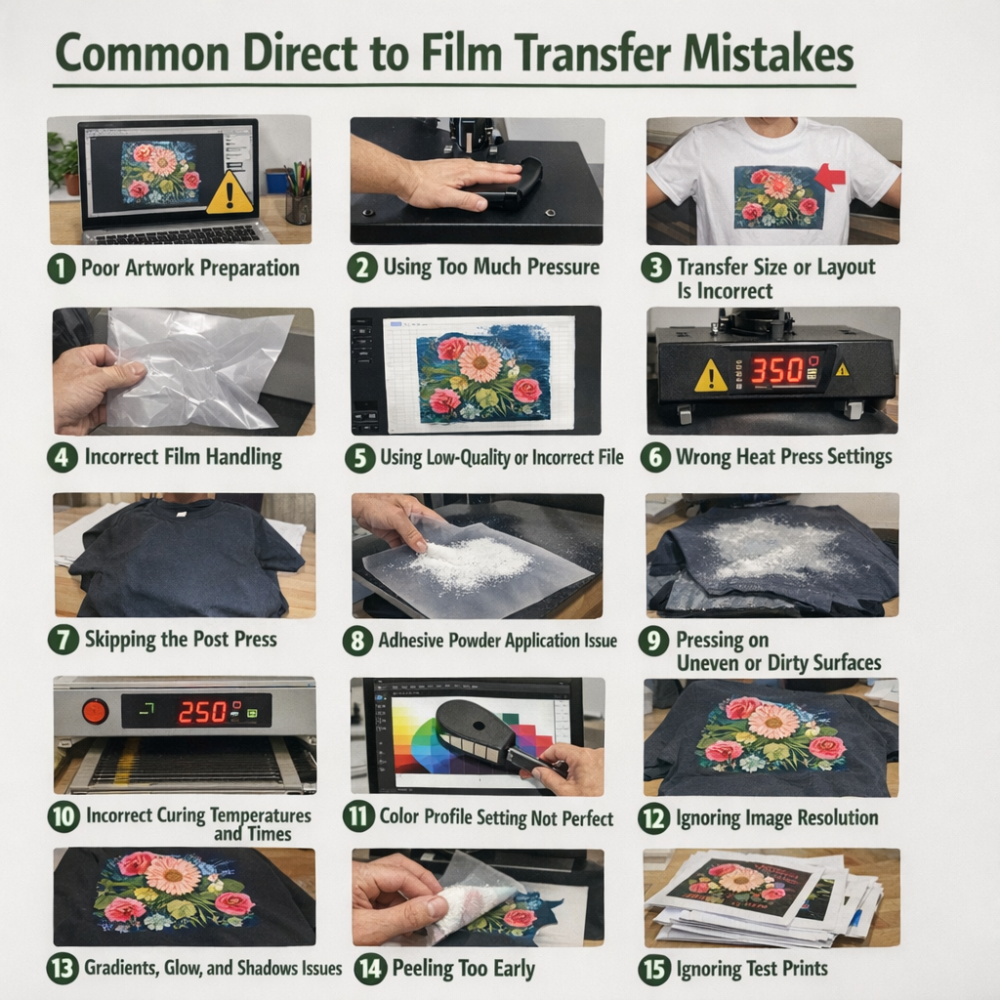
1. Poor Artwork Preparation
Poor artwork prep causes silent failures. It’s one of the most common direct to film printing issues that many businesses and shops repeat. Low DPI files. Wrong color mode. Messy backgrounds. These problems don’t show until after pressing. Then it’s too late. Prints look dull. Details break. Adhesion suffers.
What goes wrong:
-
Low-resolution or stretched files
-
RGB colors sent for print
-
Solid backgrounds left behind
How to avoid:
-
Use print-ready files only
-
Prep artwork for production, not screens
How to fix:
-
Rebuild artwork at final size
-
Convert colors to CMYK
-
Clean edges and remove backgrounds
Pro tip: If design prep isn’t your strength, rely on professional custom DTF transfers to protect quality and margins.
2. Using Too Much Pressure
Exerting too much pressure is one of the most common DTF printing mistakes. It feels harmless. It’s not. Excess pressure flattens ink, pushes adhesive into fabric, and weakens stretch. The print may look fine at first, then crack or peel after a few washes. This is a classic cause of DTF transfer errors.
What goes wrong:
-
Ink gets crushed into the fabric
-
Adhesive spreads past the design
-
Prints feel stiff and heavy
How to avoid:
-
Follow recommended pressure settings
-
Let heat do the work, not force
How to fix: Reduce pressure. Repress lightly if needed
Pro tip: Use medium, even pressure. Consistency beats force every time.
3. Transfer Size or Layout Is Incorrect
Wrong sizing ruins good prints. Too big feels heavy. Too small loses detail. Bad layout wastes film and causes press errors. This is one of those DTF printing mistakes that shows up fast and costs money.
What goes wrong:
-
One size used for all garments
-
Designs placed too close on sheets
How to avoid:
-
Measure before uploading with a ruler or tape to decide the size
-
Leave safe spacing between designs (at least ¼”) on gang sheets with prior planning
How to fix DTF transfer problems:
-
Resize at final print size
-
Rebuild the layout clean
Pro tip: Before printing, you can use our DTF gang sheet builder to confirm size and layout and avoid reprints.
4. Incorrect Film Handling
DTF film looks simple. It’s not. Poor handling causes real issues in DTF printing and shortens equipment life. Oils from hands, dust, lint, or moisture contaminate the film surface. Ink won’t bond evenly. Powder sticks where it shouldn’t. Prints peel. Heads clog. That’s a serious DTF printing problem shops often overlook.
What causes damage:
-
Touching film with bare hands
-
Exposed storage near dust or humidity
-
Bending or scratching film
How to avoid it:
-
Handle film by the edges
-
Store flat in sealed bags
-
Keep the workspace clean
How to fix:
-
Discard contaminated film
-
Clean rollers and print area
-
Reprint using fresh film
Pro tip: If the film looks dirty, don’t print. Replace it. Film is cheaper than reprints.
5. Using Low-Quality or Incorrect File
This is one of the most common direct to film transfer mistakes. Low-quality files ruin good prints fast. Uploading pixelated, low-res, flattened images kills design, resulting in blurry edges, dull colors, and bad quality prints. These mistakes in DTF printing usually start with rushed artwork or reused web files.
What goes wrong:
-
Low DPI images
-
JPEG compression
-
Upscaled raster files
How to avoid:
-
Use 300 DPI at final size
-
Prefer vector files when possible
-
Export in PNG or TIFF
How to fix:
-
Rebuild the artwork
-
Request original source files
-
Redesign at print size
Pro tip: If it looks soft on screen at 100%, it will look worse on fabric.
6. Wrong Heat Press Settings
This is a major reason why DTF transfers fail. Even perfect artwork won’t survive bad press settings. Temperature, time, pressure, and peel type all work together. Too much or too little heat or pressure will cause issues like cracking, fading, poor adhesion, and incomplete transfers. Many DTF printing mistakes happen because shops rush this step.
What goes wrong:
-
Too much or too little heat
-
Short or uneven press time
-
Excess pressure
-
Wrong peel method
How to avoid:
-
Follow film-specific recommended settings (like for T-shirts - Temp: 280-300°F, Time: 10 secs, Peel: 20-30 secs waiting after pressing, Pressure: Medium)
-
Keep pressure consistent
-
Know if it’s hot or cold peel
How to fix:
-
Repress with correct heat and time
-
Adjust pressure gradually
Pro tip: Log your best settings. Repeat them. Increase pressure when the design isn’t sticking, and lower the temperature slightly if the transfer feels stiff or the color is dull.
7. Skipping the Post Press
Skipping the post press is one of those DTF printing mistakes that looks harmless. It’s not. The first press bonds the transfer. The second locks it in. Miss it, and edges lift. Texture feels rough. Wash life drops fast.
Why it happens:
-
Rushing orders
-
Assuming one press is enough
How to avoid:
-
Always add a quick post press
How to fix:
-
Re-press with a cover sheet
Pro tip: 5–10 seconds. Light pressure. Big difference.
8. Adhesive Powder Application Issue
One of the common direct to film transfer mistakes is applying the adhesive powder incorrectly. Too much powder makes prints stiff. Too little causes weak bonding. Uneven coverage leads to patchy adhesion, cracking, and early peeling. The print may look fine at first. Then it fails after a few washes.
What goes wrong:
-
Rushing powder application
-
Not shaking off excess
-
Using the wrong powder type
How to avoid:
-
Apply evenly. Light, consistent coat
How to fix:
-
Reapply powder and re-cure if possible
Pro tip: Always tap off extra powder before curing. Balance is everything.
9. Pressing on Uneven or Dirty Surfaces
A common DTF printing problem is pressing on uneven fabric surfaces, zippers, or seams. It ruins good transfers. Uneven platens cause uneven pressure. Dirty surfaces trap lint, dust, or debris. The result? Poor adhesion. Cracks. Rough textures. Missed spots.
What goes wrong:
-
Not pre-pressing garments
-
Ignoring platen wear
-
Skipping basic cleanup
How to avoid:
-
Pre-press to flatten fabric
How to fix:
-
Repress with a clean, level surface
Pro tip: Wipe the platen often. A clean, flat press saves prints.
10. Incorrect Curing Temperatures and Times
Curing errors quietly ruin DTF prints. Too hot, and ink burns or cracks. Too cool, and powder never bonds. Timing matters just as much. Rush it, and transfers peel after a wash. Overdo it, and flexibility is gone. These are common DTF printing mistakes to avoid, especially in busy shops.
What causes issues:
-
Uneven heat
-
Guessing cure time
-
Skipping temp checks
How to avoid:
-
Follow powder and ink specs
-
Use a heat gun or oven with control
How to fix:
-
Re-cure at correct temp and time
Pro tip: Test cure once per batch. Don’t assume.
11. Color Profile Setting Not Perfect
A common issue printing shops or custom apparel businesses face in DTF is dull color or wrong color prints. Designs look bright on screen. Then prints come out dull or muddy. This happens because of a common mistake during direct to film printing process related to color profile setting. Computers use RGB for colors, and printers use CMYK for printing. Blacks turn gray. Reds lose punch. Color-management is crucial for high-quality print.
What goes wrong:
-
Designing only in RGB
-
Skipping color profiles
-
No test prints
How to avoid:
-
Set correct CMYK profiles
How to fix:
-
Re-export with proper color settings
Pro tip: Always soft-proof before printing. Test once. Save reprints.
12. Ignoring Image Resolution
Ignoring image resolution is a fast way to ruin a DTF print. Designs may look fine on screen. On fabric, they fall apart. Low resolution causes blurry edges, broken details, and weak impact. Once printed, there’s no fixing it.
What goes wrong:
-
Using web images
-
Upscaling small files
-
Skipping DPI checks
How to avoid:
-
Design at 300 DPI
How to fix:
-
Rebuild artwork at final size
Pro tip: If it’s blurry at 100% zoom, don’t print it.
13. Gradients, Glow, and Shadows Issues
When it comes to printing designs with gradients, glows, and shadows with DTF, issues may arise. Smooth fades turn banded. Soft glows print patchy. Heavy shadows crack or feel stiff. Ink builds up where it shouldn’t.
What goes wrong:
-
Too many color transitions
-
Low bit-depth gradients
-
Heavy shadow layers
How to avoid:
-
Simplify effects
How to fix:
-
Convert gradients to halftones
Pro tip: Test effects on fabric, not screens.
14. Peeling Too Early
Peeling too early is a common cause of DTF transfer errors. Timing matters in DTF, and if you peel before the adhesive fully bonds, it causes lifted edges. Besides, it weakens adhesion and details stretch. This mistake usually comes from rushing or guessing the peel type.
What goes wrong:
-
Not waiting for proper cool-down
-
Ignoring hot vs cold peel rules
How to avoid:
-
Follow film-specific peel instructions
How to fix:
-
Repress and peel correctly
Pro tip: If you’re unsure, wait. A few extra seconds protect the print.
15. Ignoring Test Prints
Skipping test prints feels efficient. It’s not. One small test could catch bad color, weak adhesion, or wrong sizing. Without it, mistakes go straight to bulk. Waste follows. So do reprints.
Why it happens:
-
Rushing production
-
Trusting screen previews
How to avoid:
-
Always run a quick test transfer
How to fix:
-
Stop the run. Adjust. Reprint correctly.
Pro tip: One test print saves dozens of bad ones.
DTF Printing Best Practices to Avoid Common Mistakes
DTF works best when the process stays controlled. Most problems don’t come from bad equipment. They come from skipped steps. Rushed jobs. Assumptions. Strong habits prevent reprints and protect margins.
Start with the basics. Every time. No shortcuts.
Best practices to follow:
-
Use print-ready artwork at 300 DPI
-
Design in CMYK, not RGB
-
Handle film with clean hands
-
Apply adhesive powder evenly
-
Cure at the right temperature and time
-
Use correct press settings
-
Follow proper peel instructions
-
Always do a post press
-
Test before bulk runs
-
Keep a clean, level press
Advanced Tips: Avoiding Additional Common DTF Mistakes
These are additional issues that can weaken print quality, durability, or workflow if ignored.
-
Poor White Ink Circulation: White ink settles quickly. When circulation is poor, clogs form, coverage becomes uneven, and prints feel rough. Always agitate white ink and follow daily circulation routines.
-
Skipping Basic Wash and Care Step: Many shops skip wash testing. Prints look fine out of the press, then fail after one wash. Always test durability and include care instructions.
-
Low-Quality Materials: Cheap film, powder, or ink causes inconsistent bonding and early peeling. Quality materials reduce reprints and save money long term.
-
Wrong Raster Image Processor (RIP) Settings: Incorrect RIP settings affect white ink density, color balance, and ink limits. Bad settings lead to heavy prints or poor adhesion.
-
Ignoring Humidity and Environment: High humidity affects powder adhesion. Dry air impacts curing. Uncontrolled environments create unpredictable results.
-
Skipping Maintenance: Missed cleanings lead to clogged heads and banding. Small maintenance gaps become big failures.
-
Overusing White Ink: Too much white makes prints stiff and brittle. Balance opacity with flexibility.
Final Thought
The direct to film transfer mistakes covered in this blog are more than technical slip-ups. They directly affect print quality, durability, and trust in your brand. From poor artwork prep and wrong press settings to curing errors and film handling, each mistake chips away at results.
The fix is simple. Stay aware. Spot issues early. Correct them fast. DTF rewards control and consistency. Shops that understand these mistakes, adapt their workflow, and keep learning produce better prints. Fewer reprints. Stronger margins. Happier customers.
Avoiding these mistakes isn’t optional anymore. It’s how you protect credibility, scale safely, and win in a growing DTF market.
FAQs - Common Direct to Film Transfer Mistakes
1. How to avoid DTF printing errors?
Use print-ready artwork, correct press settings, proper curing, and always run test prints before bulk production.
2. How to fix DTF transfer problems?
Identify the root cause first—artwork, curing, pressure, or materials—then reprint using corrected settings and process controls.
3. Why do DTF prints crack or peel after washing?
This usually happens due to poor curing, incorrect adhesive powder use, or skipping post-press steps.
4. What is the most common mistake in DTF printing?
Rushing production without test prints or proper file preparation causes most quality failures.
5. Do DTF mistakes affect profitability?
Yes. Reprints, wasted blanks, and failed transfers directly reduce margins and damage customer trust.